Just because a website sees your proxy's IP address doesn't mean all your network traffic is actually routed through it. The webpage itself might load through your proxy, while your DNS queries leak through your home connection, and WebRTC connects via an entirely different route.
Hi there! In this post, we'll explore what DNS can reveal about you, why your proxy provider's DNS matters, how WebRTC name resolution can cause its own separate leaks, and how to configure BlankTrail Proxy to secure all these routes. We'll also dive into why BlankTrail uses a proprietary database of ISP DNS servers that cater exclusively to their respective networks' customers.
1. DNS is a separate piece of the network puzzle
DNS translates domain names into IP addresses. When an application needs to find a domain, it queries a recursive resolver. This resolver either returns a cached IP or fetches it from other DNS servers. Ultimately, an authoritative server holds the actual records for any given domain. On a standard home connection, the ISP or network admin usually assigns the resolver, though users are free to change it (as explained in Cloudflare's documentation, for instance).
Loading a webpage and looking up its IP address are two completely distinct tasks. Because of this, simply configuring an HTTP or SOCKS proxy doesn't guarantee that all of your computer's DNS requests will automatically be routed through that same proxy.
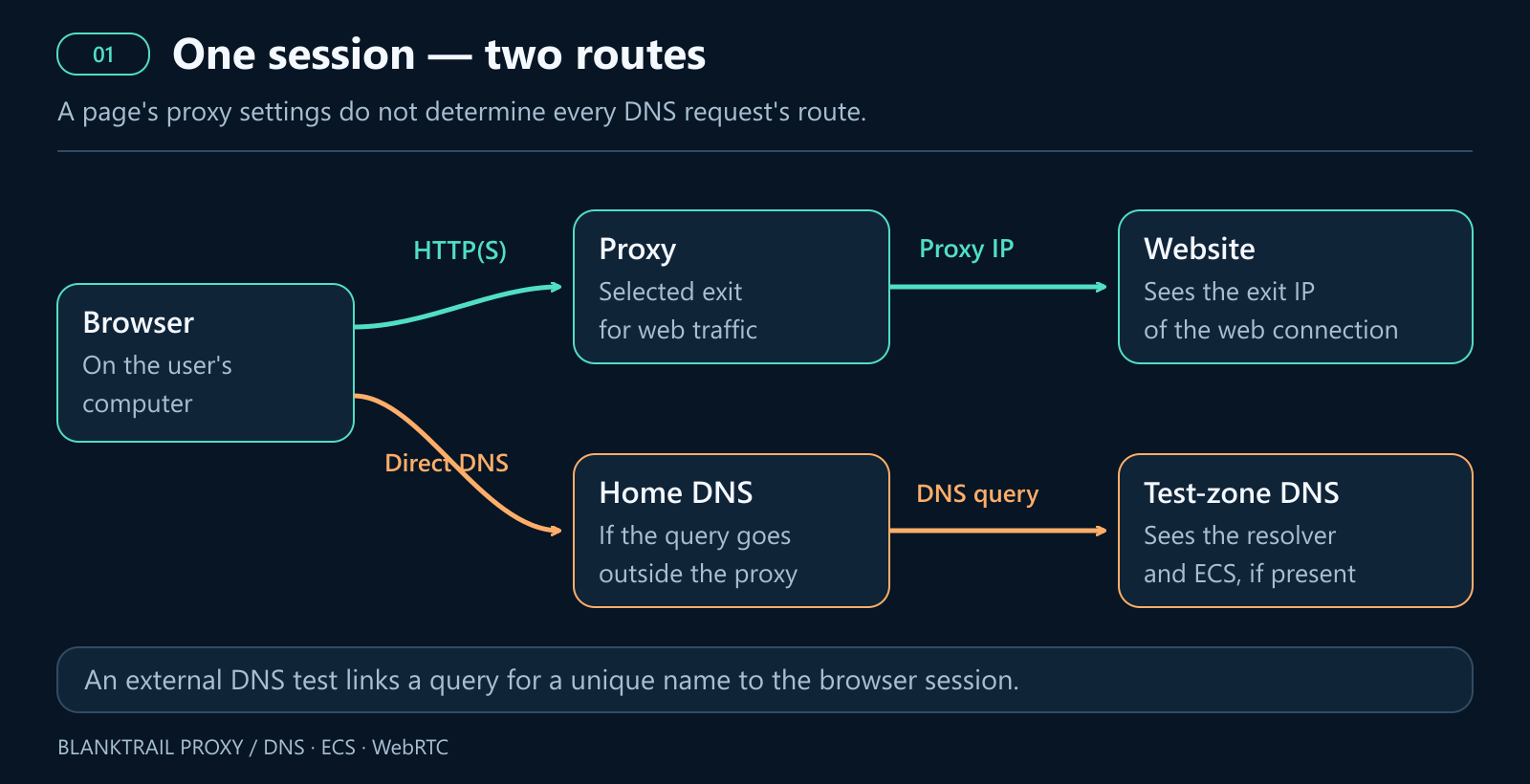
It helps to understand who actually sees your request along the way. The recursive resolver sees the IP address of the device connecting to it. The domain's authoritative server typically sees the recursive resolver's IP. However, additional client info might get passed along via ECS (EDNS0 Client Subnet, a DNS extension that lets servers forward a portion of the user's local IP). If the client bypasses the recursive resolver and contacts the authoritative server directly, that server sees the user's actual IP. These distinctions are detailed in RFC 9076.
Websites don't just receive a list of your DNS servers in standard HTTP headers. Instead, for tracking or diagnostics, a site can force your browser to look up a unique, controlled subdomain and tie that DNS query to your active session. This sneaky test reveals exactly where the DNS request originated and whether it exposed your ECS. That's why DNS serves as such a powerful, secondary signal for anti-fraud systems analyzing your connection.
2. Why using the proxy ISP's DNS looks more natural
On a standard home or mobile connection, your IP address and DNS usually belong to the exact same network ecosystem: your ISP provides both. Historically, the network itself dictated your system DNS, even though modern apps can now override this and choose their own. You can read more about this background in RFC 9076's discussion on resolver selection.
Imagine an HTTP request coming from a residential IP on one ISP, but a DNS check reveals a home ISP resolver located in an entirely different country. Any anti-fraud system correlating these signals will immediately spot a red flag: why do two requests tied to the exact same session belong to completely different networks?
The main takeaway is that for residential or mobile proxies, using that specific ISP's DNS creates a much more consistent, believable profile. It perfectly matches the connection providing the main web traffic. Keep in mind, this is about maximizing signal consistency—not necessarily a hard-and-fast rule used by every single anti-fraud system out there.
Subscriber DNS vs. open resolver lists
An ISP's recursive resolver is usually locked down to serve only its own network's customers, accepting their requests while blocking outsiders. An open resolver, on the other hand, responds to absolutely anyone who queries it. This distinction is crucial: a subscriber network's DNS mimics the natural way addresses are resolved on that specific connection.
Scraping a public list of working DNS servers doesn't replicate a true ISP DNS setup. Even if a server on that list is in the right country or registered to a legitimate ISP, it might still be an open resolver available to the public. Just because it answers a query doesn't mean it's the actual, dedicated subscriber resolver for that network. For anti-fraud systems correlating IPs with DNS infrastructure, using random open resolvers completely defeats the purpose of trying to blend in with ISP-level consistency.
In fact, bouncing your traffic off a random open resolver on a completely unrelated network can actually look more suspicious than just using Google Public DNS. Regular people use Google DNS, so there's a perfectly logical explanation for seeing it. Its massive popularity is obvious—according to APNIC Labs' May 2026 data, nearly 10% of global internet users rely on it, and over 20%—one in five users— have it configured as a backup. Compare that to a residential IP suddenly querying a weird, unknown open resolver run by a completely different operator; it doesn't look natural just because they happen to be in the same country. Again, this is about ensuring your signals are consistent, though individual anti-fraud systems might weigh these factors differently.
Of course, regular people use public DNS too. Some ISPs outsource their resolution, browsers come with secure DNS enabled by default, and corporate networks frequently rely on shared infrastructure. So, seeing Google DNS or Cloudflare doesn't automatically mean "bot". However, as that same May 2026 APNIC Labs study shows, Google DNS accounts for only about 6% to 18% of global traffic, depending on the region. While it's the largest alternative provider (with Cloudflare as its only real rival), that's still a tiny slice compared to the vast majority of people using their ISP's default DNS. From an anti-fraud perspective, using the connection's native ISP DNS provides a massive trust boost: over 80% of real humans use it, whereas bots almost never do.
Datacenter proxies are a bit of a different story. The datacenter exit might not even have a standard subscriber DNS available. In those cases, it makes way more sense to just pick a stable, consistent resolution method rather than trying to spoof the DNS to look like a home ISP.
3. How DNS leaks your IP address or subnet
Querying the resolver directly
If a DNS request is sent straight from your home connection, the resolver sees your public IP. If you're behind a home router or CGNAT, this will be your network's external IP, not your computer's local, private address. Now, a website receiving HTTP traffic through a proxy won't automatically learn your home IP—it needs a specific way to observe the leak. Unfortunately, major websites with advanced anti-fraud systems are actively looking for and measuring exactly these kinds of leaks.
ECS: leaking your subnet inside the DNS request
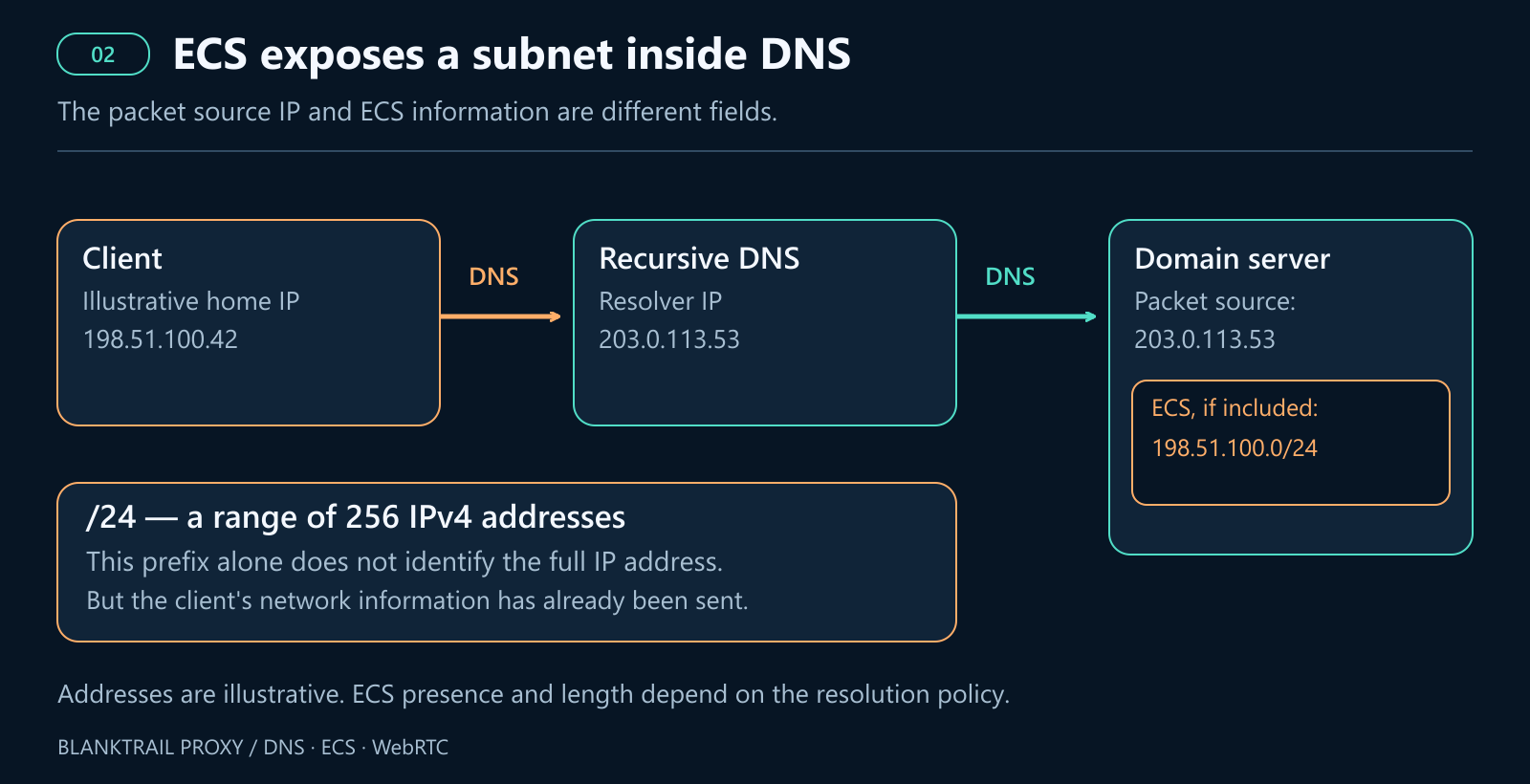
EDNS Client Subnet (ECS) is an optional DNS extension that transmits details about the user's local network. It's designed to help route you to the fastest, closest CDN node. The downside? It can leak parts of your real IP address directly to the domain's authoritative server. To maintain some level of privacy, RFC 7871 recommends truncating IPv4 addresses to a /24 subnet and IPv6 addresses to /56.
For instance, if your home IP is 198.51.100.42, your ECS data might pass along 198.51.100.0/24. While this represents a block of 256 addresses rather than pinpointing your exact device, it still exposes your home network and makes it incredibly easy for trackers to link your activity across multiple sessions. The exact size of the subnet prefix depends on how it's implemented; if a full-length prefix is sent, your exact IP is totally exposed.
Google Public DNS supports ECS and actively checks if authoritative servers accept it. Because of this, ECS isn't rigidly attached to every single Google query; its behavior shifts depending on the zone and the server you're querying (see Google's ECS guidance). Cloudflare's 1.1.1.1, on the other hand, strictly refuses to send ECS data for standard domains, with their documentation noting a rare exception only for Akamai's diagnostic tools.
As you can see, simply using a "public DNS" doesn't guarantee your home subnet is hidden. You have to inspect the actual ECS data being transmitted. And even if your DNS request is routed safely through a proxy tunnel, it might still carry an exposed home subnet if your local client injected that data before forwarding it.
Multiple routing paths and fallback DNS
Mixing and matching network settings is a huge source of leaks. Your browser might use its own DoH (DNS over HTTPS), while a background system service queries your router's DNS, and a helper app utilizes an entirely different resolver. If your primary routing fails, a fallback DNS might silently take over. Don't forget about IPv6, either—securing your IPv4 traffic doesn't automatically protect the IPv6 stack.
Bottom line: just because you see a clean, ECS-free request or a familiar resolver name on one single test doesn't mean every subsequent request from that application is fully protected.
4. WebRTC: name resolution first, connection second
WebRTC allows browsers to directly communicate and exchange audio, video, and data. When setting up a connection, the browser gathers "ICE candidates", which are basically a list of potential IP addresses and routing methods to use. STUN and TURN servers are often part of this process (you can read more about it in WebRTC's peer connection guide).
To properly secure WebRTC, there are two totally independent stages you have to check.
Stage 1: Resolving the STUN or TURN server's IP
If the WebRTC server is defined by a domain name, the browser first has to figure out its IP address. This triggers a completely separate DNS lookup exclusive to WebRTC—it's not part of standard HTTP page loading. In Chromium-based browsers, the P2P component fires off a custom DNS request via HostResolver (as seen in the P2PSocketManager source code).
While this is a separate background call, it doesn't necessarily mean WebRTC will always bypass the browser's built-in DoH; sometimes the components share the same DNS resolver. The actual routing depends heavily on the browser engine, its specific version, and how it's configured. If this background DNS request slips past your proxy and hits your local system DNS, a leak occurs before a single STUN packet is even sent. (Note: if the WebRTC server is set as an IP address, this DNS step is skipped entirely. Similarly, cached DNS answers can mask a leak during repeated testing.)
To accurately test this, you need to query a unique STUN server name hosted in a controlled DNS zone. This will reveal the exact route your browser uses to resolve WebRTC domains. Standard web-page DNS leak tests will not catch this.
Stage 2: Sending the actual STUN request
Once the browser has the IP address, the real network communication kicks off. The STUN server looks at the source of the incoming packet and bounces the observed IP and port back to the client. Keep in mind, this is STUN's primary function, not DNS's (as outlined in RFC 8489).
If that packet goes directly over your standard internet connection, the STUN server will see your true, unmasked home or mobile IP. Securing your standard web traffic with a proxy doesn't guarantee your WebRTC traffic will follow the same path. For instance, Chromium relies on SOCKS5 for TCP web requests, but it won't use it to forward UDP traffic (see Chromium's proxy docs). The very real risk of STUN checks going past a standard proxy is also covered in RFC 8828.
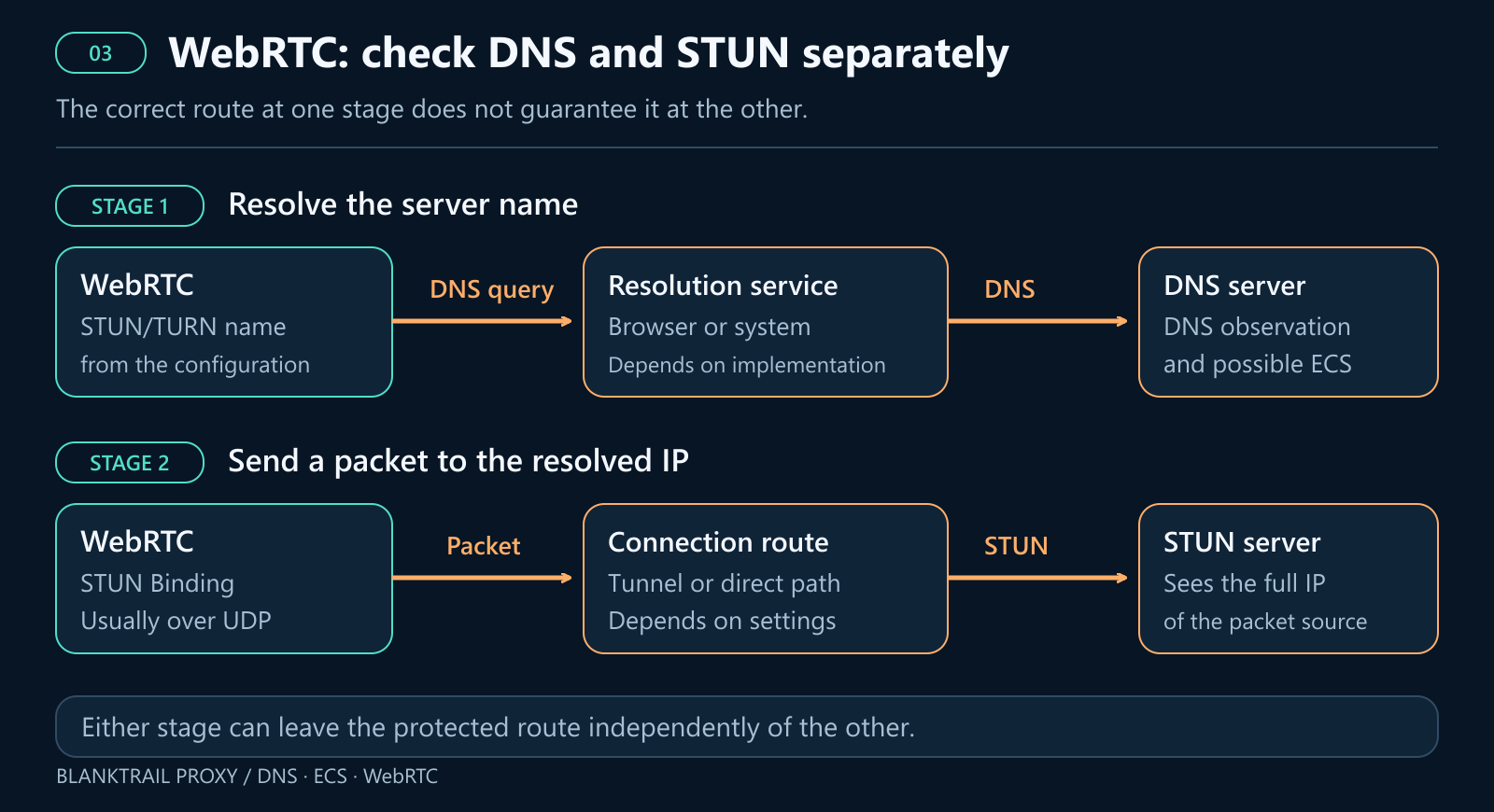
You can easily fail on either front: your STUN server's name might resolve through the correct, secured DNS, but the actual UDP packet leaks out over your raw home connection. And the STUN packet might route perfectly through the proxy tunnel, but the initial DNS lookup leaked through your home resolver. Patching one hole doesn't magically fix the other.
Spoofing or replacing WebRTC addresses at the JavaScript level won't change the source IP of a packet that has already left your machine. The server still logs your real IP independently. Similarly, using mDNS names for local ICE candidates is a neat trick for hiding local network IPs during the exchange, but it does absolutely nothing to protect your external, public route (as detailed in the IETF draft on mDNS and ICE).
5. Why DoH alone isn't enough
DNS-over-HTTPS (DoH) encrypts your queries as they go to the DoH server. However, encryption doesn't determine your routing path. If your connection to an external DoH service bypasses your proxy, the DoH provider still sees your true home IP. Furthermore, if your query contains ECS data, wrapping it in HTTPS won't scrub that data out.
You also have to pay close attention to how your browser handles failures. For instance, Firefox's "Default Protection" will quietly fall back to your standard, unencrypted system resolvers if DoH fails. "Max Protection" will throw a warning if secure DNS goes down, but even then, specific domain exceptions might still leak queries to your local system DNS (see Firefox's DoH settings for details).
A truly secure route requires three things: the right DNS server, the correct routing path to reach it, and zero chance of an unplanned fallback to your home DNS. Simply flipping on your browser's DoH setting only protects the specific HTTP requests the browser handles—it won't magically reroute all of your computer's background traffic or lock down every rogue WebRTC connection.
6. How BlankTrail Proxy solves this
BlankTrail tackles this problem in two parts: first, by selecting the optimal DNS resolution method, and second, by forcing the application's requests to actually use it. And for WebRTC, we enforce strict control over the underlying network communication itself.
vDNS: Our proprietary database of subscriber DNS resolvers
BlankTrail utilizes a massive, custom-built database of genuine ISP DNS servers that cater exclusively to their own network subscribers. Our database covers more than 4,000 ISPs and over 10,000 unique DNS servers. When you connect, our vDNS technology instantly identifies your proxy exit's ISP and location, then seamlessly pairs it with the most appropriate, functioning resolver from our database.
Routing through authentic subscriber DNS infrastructure on matching proxy exits gives you a massive advantage. Public lists of open DNS servers are full of generic resolvers that will answer anybody; they don't provide the authentic, native pairing of an IP and its dedicated ISP resolver. Simply pulling from a massive list of random open DNS IPs doesn't magically make your network fingerprint look any more legitimate.
Furthermore, just setting a subscriber DNS IP into your computer's settings won't work. If you try querying a closed ISP resolver from an outside network, it will likely refuse the connection or drop the request. To make it work, the DNS query has to be routed through an IP that actually belongs to that ISP's network. By doing this, the target website receives the web traffic from the proxy IP, while their backend DNS checks see a perfectly matched ISP DNS infrastructure.
If a perfectly matched ISP DNS isn't available for a specific exit, BlankTrail can fall back to other solid methods: using a public resolver that passes the proxy's subnet via ECS, resolving independently directly through the proxy exit, or delegating the DNS lookup entirely to the upstream proxy. The best choice depends on the proxy type and your specific DNS policy. With independent resolution, the queries hit the authoritative servers directly from the proxy IP. While this successfully aligns the IP addresses, it still doesn't perfectly mimic the behavior of a standard ISP subscriber resolver.
vDNS is enabled by default in BlankTrail. You can easily adjust its operating mode in the port settings: on_leak only applies vDNS if our preliminary checks detect a DNS leak, whereas forced uses it constantly. If ECS data is transmitted, BlankTrail ensures the broadcasted subnet perfectly matches your chosen proxy exit. You can also enable a strict error-handling policy to kill the connection if DNS fails, ensuring your traffic never slips out over an unprotected route. The default mode is auto, which prioritizes native ISP DNS servers. If a matching ISP server isn't available, it falls back to major public DNS providers like Google, Cloudflare, and Quad9. If those fail (or they actively block the site you need), the system will attempt to resolve the DNS directly through the proxy exit itself, or delegate it upstream to let the proxy provider handle the lookup.
Custom DoH: routing browser queries directly to BlankTrail
To capture DNS queries that browsers attempt to make independently, BlankTrail hosts a built-in DoH server directly on the product's assigned port. Simply paste this address into your browser's secure DNS settings. Once configured, all browser DNS requests are safely tunneled through the proxy exit, strictly obeying that port's customized DNS policy.
BlankTrail aggressively strips out any incoming client ECS data. Whether or not a new subnet is appended is dictated entirely by your port settings. This foolproofs your setup, ensuring a request doesn't accidentally leak your real home subnet while traveling through a secure tunnel.
You can set up independent browser profiles to use different DoH endpoints on different ports, assigning a unique proxy exit to each one. Just make sure you set the browser to a strict mode so it doesn't try to auto-fallback to your local system DNS. (And don't forget to run a separate check to verify that your specific browser routes WebRTC resolution through this same path!)
TUN: capturing system DNS and non-proxy traffic
If some application relies on background system services for its network requests or just ignores your proxy settings, our TUN interception steps in. BlankTrail fully supports TUN interception on both Windows and macOS, allowing you to wrap the entire system or just target specific apps. On Windows, a background system service handles the routing; on macOS, a system daemon (managed by launchd) leverages the native utun interface. You can route the entire OS or isolate individual applications, customizing the interception rules on a per-port basis. (See our interception documentation for a deep dive).
On macOS, targeting an app automatically encompasses its entire .app bundle, gracefully catching any hidden, nested helper processes. This is absolutely critical for web browsers, which frequently spawn separate background helpers to handle network connections. Our interception rules bind to the whole application—not just the main executable—and even respect parent-process hierarchies when determining the routing path.
Both platforms safely capture standard system-level DNS queries. On macOS, BlankTrail hooks directly into the OS network configuration to control the system resolvers (which are utilized by the shared mDNSResponder service). Because of this shared architecture, merely selecting a browser in the intercepted apps list doesn't guarantee that every single DNS query it spawns will be easily identifiable as belonging exclusively to that specific browser process.
If you're using individual-application mode, you must explicitly enable system DNS capture and verify the port it's bound to. If you have different apps pointing to different ports and exits, you need to manually assign that specific DNS port. Keep in mind: because the OS system resolver is a shared resource, you can easily route different apps through different proxy exits, but you can't dynamically split that shared system DNS to act as a unique, isolated DNS context for every single browser profile.
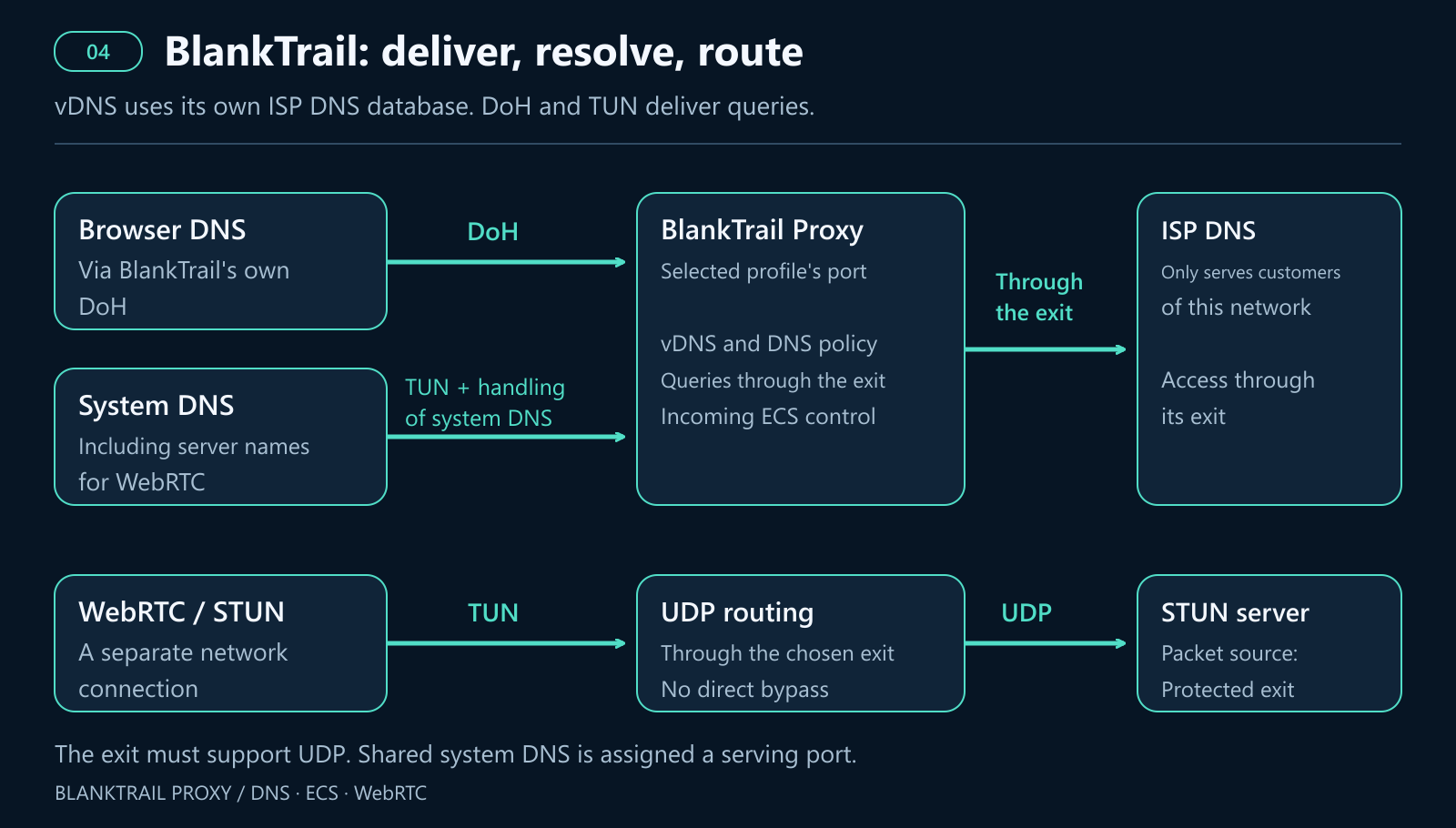
This comprehensive interception net catches everything: WebRTC DNS queries hitting the system resolver, and WebRTC's raw network connections. However, for STUN packets to successfully travel over UDP, your proxy exit absolutely must support UDP (e.g., via a standard tunnel or a SOCKS5 UDP relay). A basic HTTP proxy simply won't cut it.
If your proxy exit doesn't support the required UDP traffic, the connection should fail—it should absolutely not fall back to your unprotected home network. Because of this, verifying WebRTC functionality and verifying the absence of leaks are two very different tests. BlankTrail's built-in bypass checks can monitor or outright block this rogue traffic, while vDNS, DoH, and TUN each handle their own specific part of securing the puzzle.
7. Reading the results: examples from the audit dashboard
Our audit.blanktrail.com detector generates an easy-to-read HTML browser report and outputs the raw session data in JSON format. For API/scripting users, HTTP clients have a dedicated /client endpoint that outputs JSON. The browser report cleanly separates your standard DNS observations, the local WebRTC IPs reported by your browser, and the actual server-side STUN observations.
Below, we've outlined three educational scenarios using static HTML grabs from our real audit dashboard. The IPs, countries, domains, query counts, and verdicts are simulated to help explain how the mechanics work under the hood. (Note: these aren't literal "before and after" BlankTrail benchmarks). The fourth example is a fully anonymized response taken from a real HTTP client test.
For these three scenarios, let's assume the expected proxy exit IP is 203.0.113.10 (subnet 203.0.113.0/24). Your actual home IP is 198.51.100.42 (subnet 198.51.100.0/24). The proxy exit's native resolver is 192.0.2.53, while your local home resolver is 192.0.2.54. (These are standard placeholder IP ranges and don't reflect any real-world connections).
Example 1. STUN routes through the proxy, but WebRTC DNS leaks the home subnet
Looking at the DNS table, the row marked p1 represents a standard webpage DNS probe; its resolver and ECS perfectly match the proxy exit. However, the row labeled rtc1 is a background WebRTC name-resolution probe, and it's leaking by using an external resolver and exposing your home subnet. (Our actual testing script runs four of these WebRTC probes, rtc1 through rtc4, checking STUN and TURN over different transports. We've simplified the table to two rows for clarity).
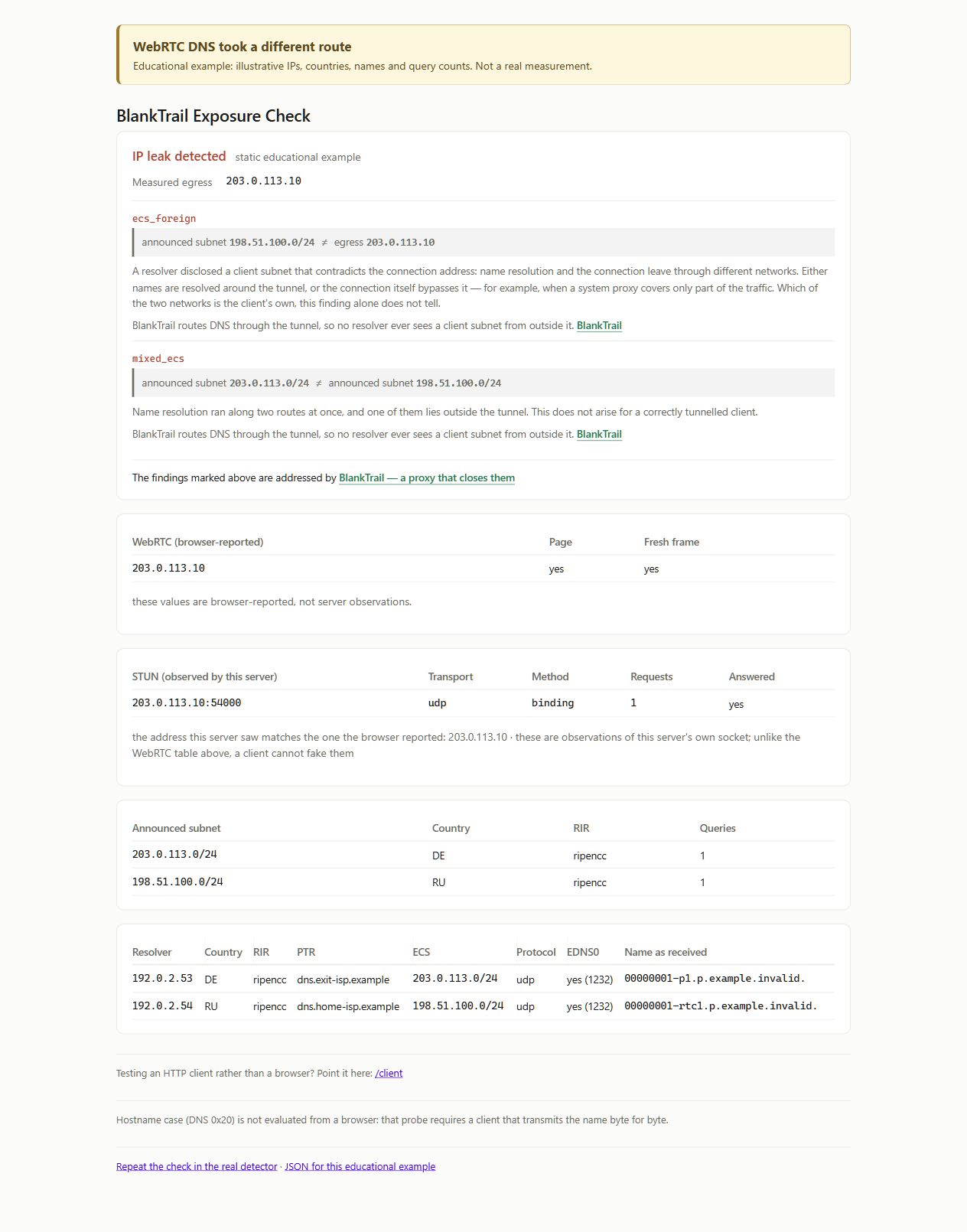
The ecs_foreign warning flags that a subnet was broadcasted that does not match your main proxy exit. The mixed_ecs warning indicates that multiple, conflicting ECS values were logged during the same session. Meanwhile, if you look at the WebRTC table, the browser reports 203.0.113.10, and the STUN server successfully observes 203.0.113.10:54000. In this scenario, the actual STUN packet exchange perfectly matched the proxy; the leak happened entirely in the background during the initial name resolution phase.
When auditing your own setup, always inspect the individual rows. Keep in mind that mixed ECS values might just mean your proxy IP rotated mid-session. Look at the specific probe names to pinpoint which requests belong to WebRTC—relying on warning codes alone won't tell you the whole story.
Example 2. DNS is clean, but the STUN packet leaks the home IP
In this scenario, both DNS probes cleanly use the proxy exit resolver and broadcast the correct subnet. But wait—the browser is reporting the local IP 198.51.100.42, and the remote STUN server literally sees a raw UDP packet arriving from 198.51.100.42:54000. The system flags this with a critical webrtc_foreign warning.
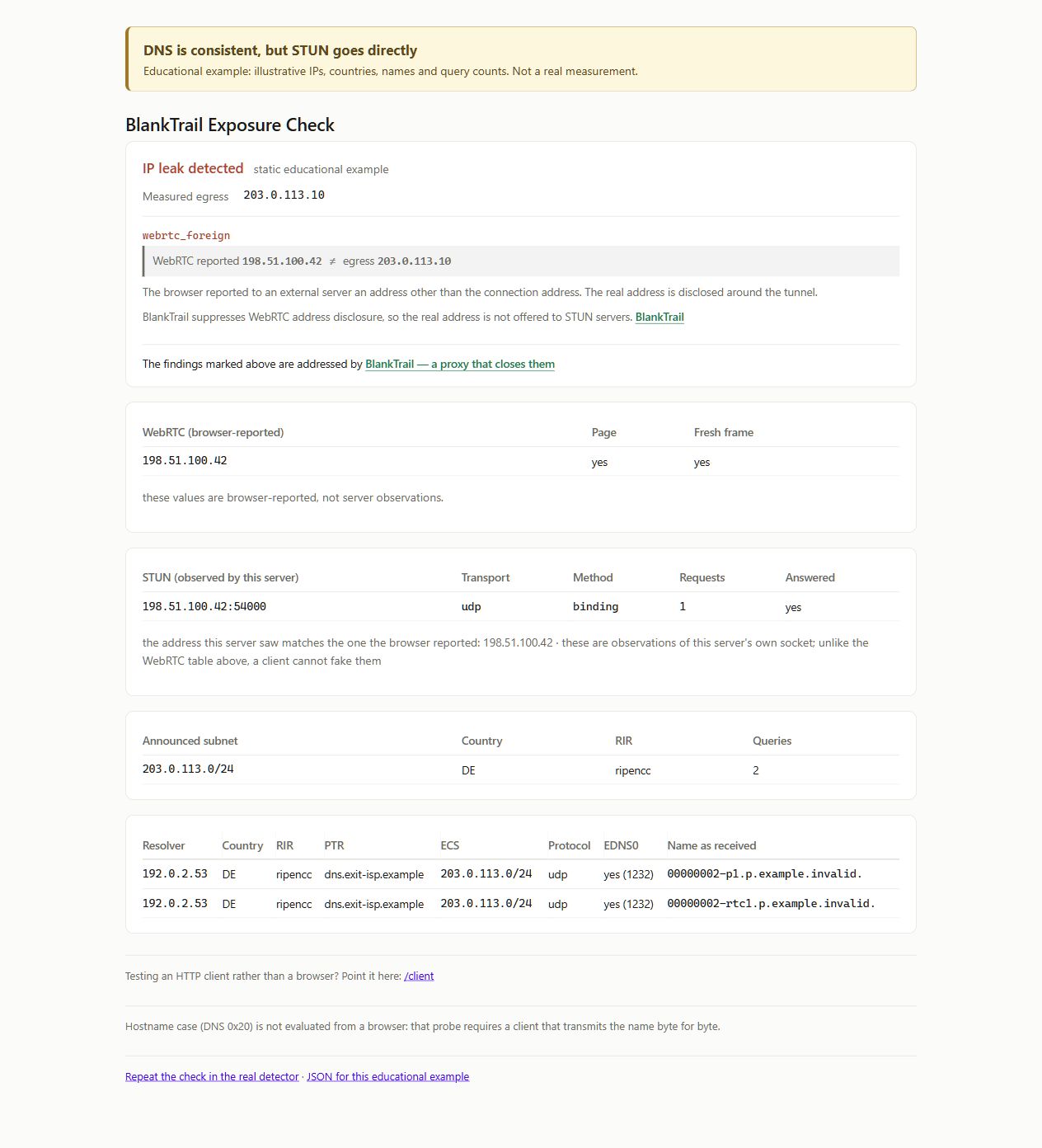
In this case, obsessing over your DNS settings is pointless. The browser resolved the server address through the secure tunnel, but then bypassed the proxy entirely to send the actual network connection. The remote server's independent observation cuts right through any Javascript spoofing the browser might try to display. To fix this, you have to lock down WebRTC's routing path—either by using a TUN interface bound to a proxy that supports UDP, or by outright blocking unsupported UDP traffic so it can't leak.
Example 3. All channels perfectly match the proxy exit
In this final scenario, the standard DNS and WebRTC DNS both route through the correct proxy exit resolver, the ECS broadcasts the correct proxy subnet, and both the local browser and the remote STUN server report the proxy IP. This example triggers the dns_resolver_native confirmation flag. (Again, this just illustrates what the interface message looks like, rather than performing a live lookup against our actual database).
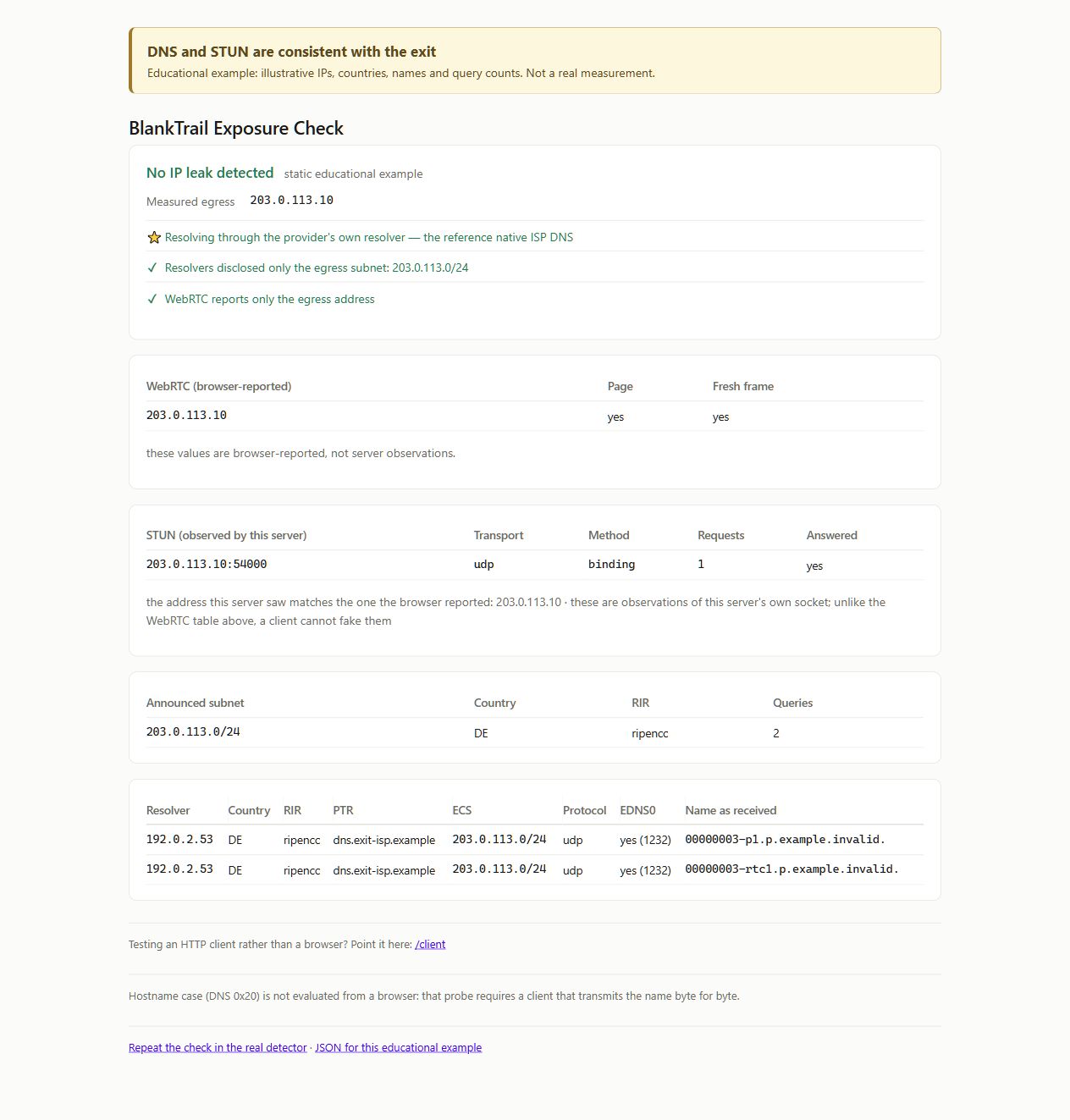
This is the gold standard: vDNS, DoH, and TUN are all configured perfectly and working in harmony. However, keep in mind that getting a "green" result only validates the specific observations caught during that single session. It doesn't guarantee the behavior of other applications, backup fallback routes, or future browser sessions. Furthermore, if you've simply blocked WebRTC entirely, don't mistake the absence of STUN leaks as proof that STUN is successfully routing through your proxy!
Example 4. HTTP client JSON output after a DNS probe
The /client endpoint handles things a bit differently. The initial API response hands you a dns_probe_url. If you request that specific URL using the exact same HTTP client and proxy setup, the unique domain triggers a DNS probe, and the subsequent JSON response will include a detailed dns block. Below is a real-world response to one of these requests. We've redacted the user's personal IP, subnet, PTR record, and probe name, but left the actual structure, public resolver, and other raw data intact.
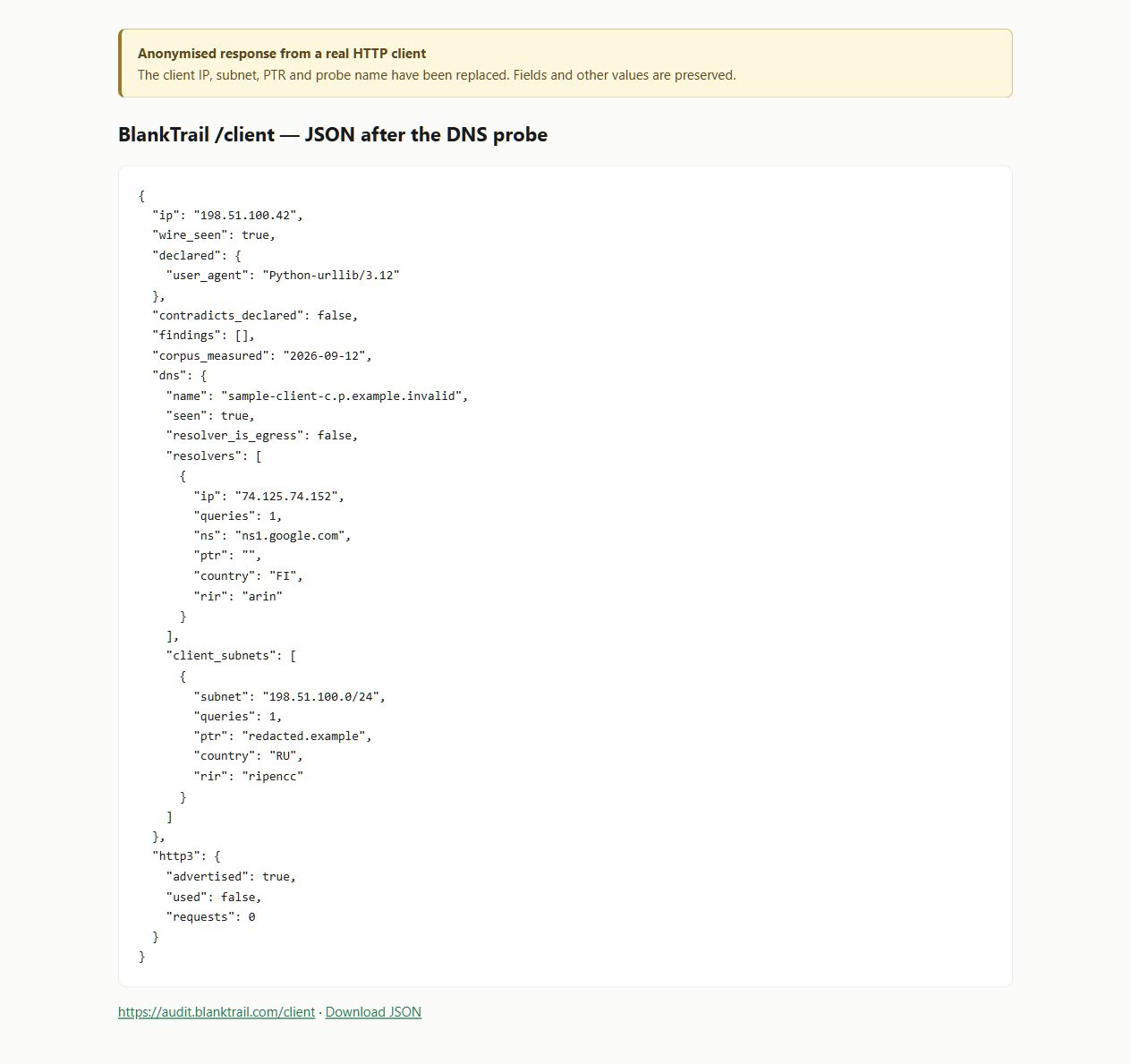
The dns.resolvers array lists the actual DNS servers that caught the query, while dns.client_subnets lists any subnets transmitted via ECS. In this specific response, you can see a Google Public DNS resolver and injected ECS data. The flag resolver_is_egress: false simply means the DNS resolver's IP didn't perfectly match the HTTP client's IP. Don't panic—that alone doesn't prove a leak, since DNS resolvers are almost always hosted on entirely separate servers.
Take note: seeing an empty findings array in this JSON response is not an excuse to skip proper DNS analysis, and it certainly doesn't prove you're safe from WebRTC leaks. A standard HTTP client (like curl) isn't capable of running complex browser ICE probes. Similarly, seeing http3.used: false just means the connection didn't utilize HTTP/3; it has nothing to do with DNS leaks.
8. How to test this yourself
Make sure you run these checks using a stable, sticky proxy IP so that mid-session IP rotation isn't mistakenly flagged as a leak. Before starting, jot down your browser version, proxy type, expected proxy IP, vDNS mode, DoH settings, and your TUN configuration.
- Open the browser detector using the specific browser profile you want to test, ensuring you're routed through the proxy. Select English if needed and wait for the page to display "completed".
- Verify the detected exit IP. It should perfectly match your proxy. Be sure to check IPv4 and IPv6 independently. If an automatic IP rotation caused a mismatch, grab a static proxy IP and run the test again.
- Analyze the DNS table. Compare the standard web probe names with the WebRTC probes (
rtc1throughrtc4). Verify the resolvers, operators, and any exposed ECS data. Remember: a missing row just means the server didn't catch an observation—it doesn't definitively prove the route is secure. - Cross-reference WebRTC and STUN data. Look at the local browser-reported table, then look at the remote server-observation table. Ensure the actual source of the STUN packet matches your proxy exit IP. Never trust an IP address generated solely by local JavaScript.
- Tweak your settings and retest. After enabling vDNS, adjusting DoH, or locking down TUN, click "Run the test again" and wait for the results. Every new session spins up brand-new diagnostic domain names. Save your screenshots and JSON outputs so you can directly compare the before-and-after data.
- Test for failure leaks. If your selected DNS goes down or the proxy tunnel drops, your system absolutely must not fall back to a direct, unencrypted route. Remember: having a connection get cleanly blocked is a much better, safer outcome than having it silently leak through your real IP.
You can find your specific browser session ID in the page log next to the session … line. You can pull the full raw JSON data for your test by visiting https://audit.blanktrail.com/api/session/<ID> (just swap <ID> with your actual session string). From there, you can dig into the observations, resolvers, client_subnets, webrtc, stun, and verdict arrays independently. (Note: the HTML examples shown earlier are just stylized grabs of the standard web dashboard; there is no hidden HTML export button you need to hunt down).
Running the test via an HTTP client (CLI)
You can can send a request to the /client endpoint using any standard HTTP client or script. For example, if you're testing curl over SOCKS5, run the following command (swapping in your actual proxy credentials and port):
curl --silent --show-error --proxy socks5h://USER:PASS@127.0.0.1:20134 https://audit.blanktrail.com/client*(Note: If you're using Windows PowerShell, type curl.exe to bypass the built-in PowerShell alias).* In the socks5h:// protocol string, the h instructs curl to pass the hostname directly to the proxy for remote DNS resolution (see the curl documentation). Remember, this is strictly a curl setting; it has absolutely zero effect on how a completely separate web browser handles its DNS or WebRTC traffic.
Next, copy the exact dns_probe_url string generated in that first JSON response and fire off a second request using the exact same proxy parameters. In the command below, replace everything inside the quotation marks with your unique URL:
curl --silent --show-error --proxy socks5h://USER:PASS@127.0.0.1:20134 "DNS_PROBE_URL_FROM_FIRST_RESPONSE"Save the resulting JSON output and inspect the dns array. A quick tip: if you're coding a custom script or bot, make sure to execute both of these requests using your actual software stack. A standard curl test only validates curl's specific routing path. To test WebRTC leaks, you must return to the standard browser detector.
9. Conclusion
A truly secure, consistent browser session requires total lockdown over every single network route. The main IP, standard web DNS, WebRTC DNS, transmitted ECS data, and raw STUN packet sources must all perfectly align with your proxy connection. If you're only checking your main webpage IP address, you're leaving a half-dozen other channels wide open for leaks.
For residential and mobile proxies, mimicking the native ISP's default DNS is incredibly important. BlankTrail's massive database contains authentic subscriber resolvers that cater exclusively to their respective networks. By pairing them with a matching proxy exit, you perfectly mimic the DNS infrastructure used by real humans on that ISP. Scraping random open servers off public lists doesn't build that level of trust, even if the IP happens to geolocate to the correct country.
BlankTrail attacks this problem from all angles using a unified configuration. First, vDNS selects the perfect resolution method and pulls from our custom ISP DNS database. Next, our built-in DoH server intercepts and funnels browser queries directly to it. Finally, TUN interception casts a wide net, capturing stubborn system DNS queries and rogue background apps. Because WebRTC name resolution and STUN network packets operate independently, BlankTrail tightly controls them both. And if a proxy exit doesn't support the required UDP traffic, BlankTrail simply blocks the connection instead of letting it leak out over your raw home network.
Don't guess—verify your setup by looking at the hard data: which resolver handled the query, which subnet it broadcasted via ECS, and the exact IP address the remote STUN server logged. Open the BlankTrail detector before and after adjusting your settings, let the tests finish, and compare the results side-by-side. This will show you exactly which routes are secured and where you might need to tweak your configuration further.