Hello! Today, we’ll use real examples to examine network leaks in ZennoPoster: where it reveals its network fingerprint, where your IP address can bypass the proxy altogether, and how to fix this.
We’ll walk through the observations shown in the screenshots, explain what causes them, and show you how to compare connections with and without BlankTrail Proxy yourself.
1. The Zenno browser and its HTTP client are different network clients
ZennoPoster’s built-in Chromium generates the correct network fingerprint for its own version. When the profile matches that engine and its exact version, there is no need to change the fingerprint just for the sake of spoofing it.
Problems arise when they don’t match: for example, the profile claims to be Safari on an iPhone, while the connection retains the characteristics of the original Chromium. A site can compare the User-Agent and Client Hints against TLS and HTTP/2 parameters and see that they belong to different clients.
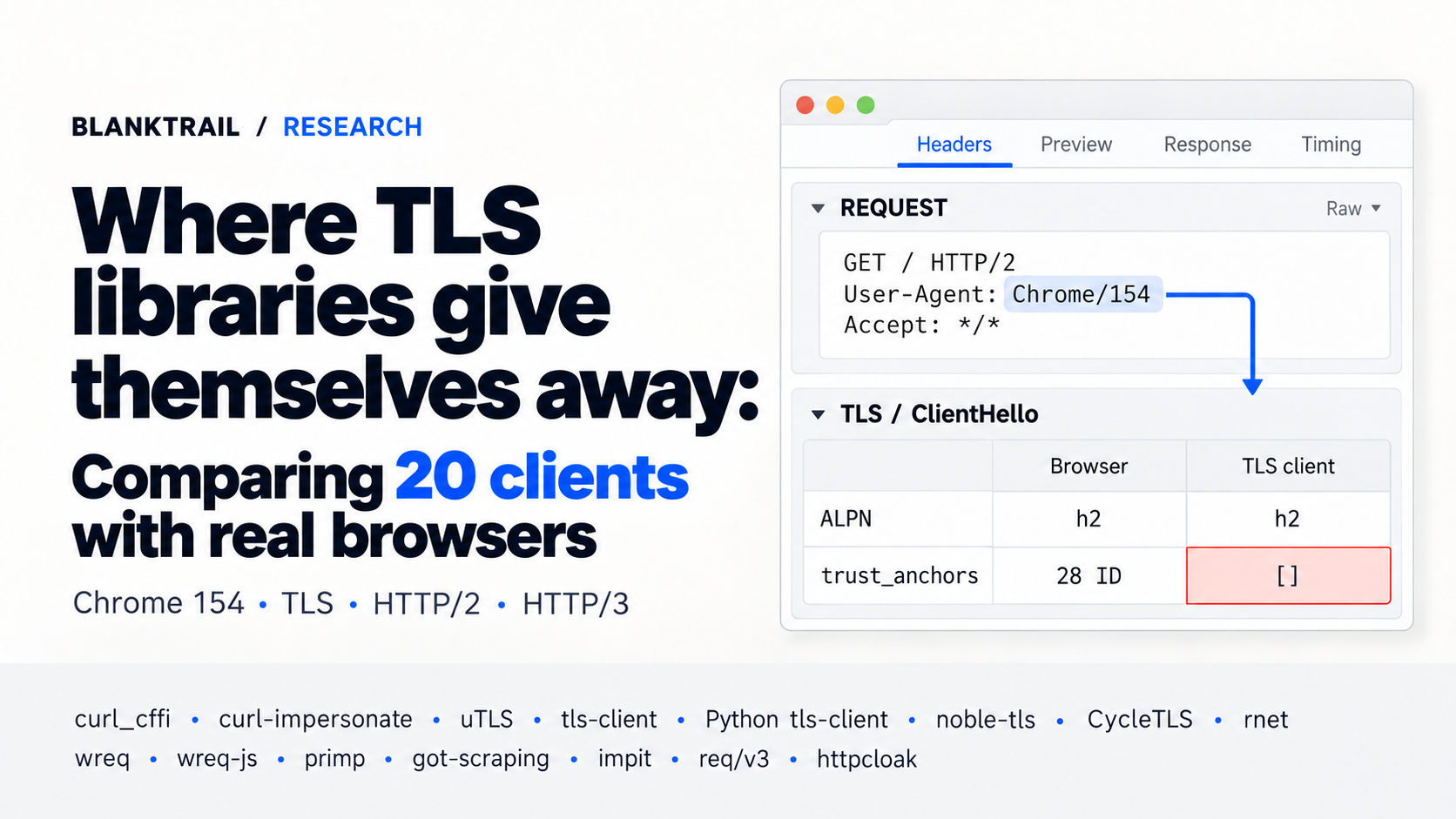
HTTP clients are a different story. Being able to send a Chrome header does not turn an HTTP library into Chrome: the client itself generates the TLS handshake, HTTP/2 settings, and protocol exchange behavior.
What a control request from a real browser looks like
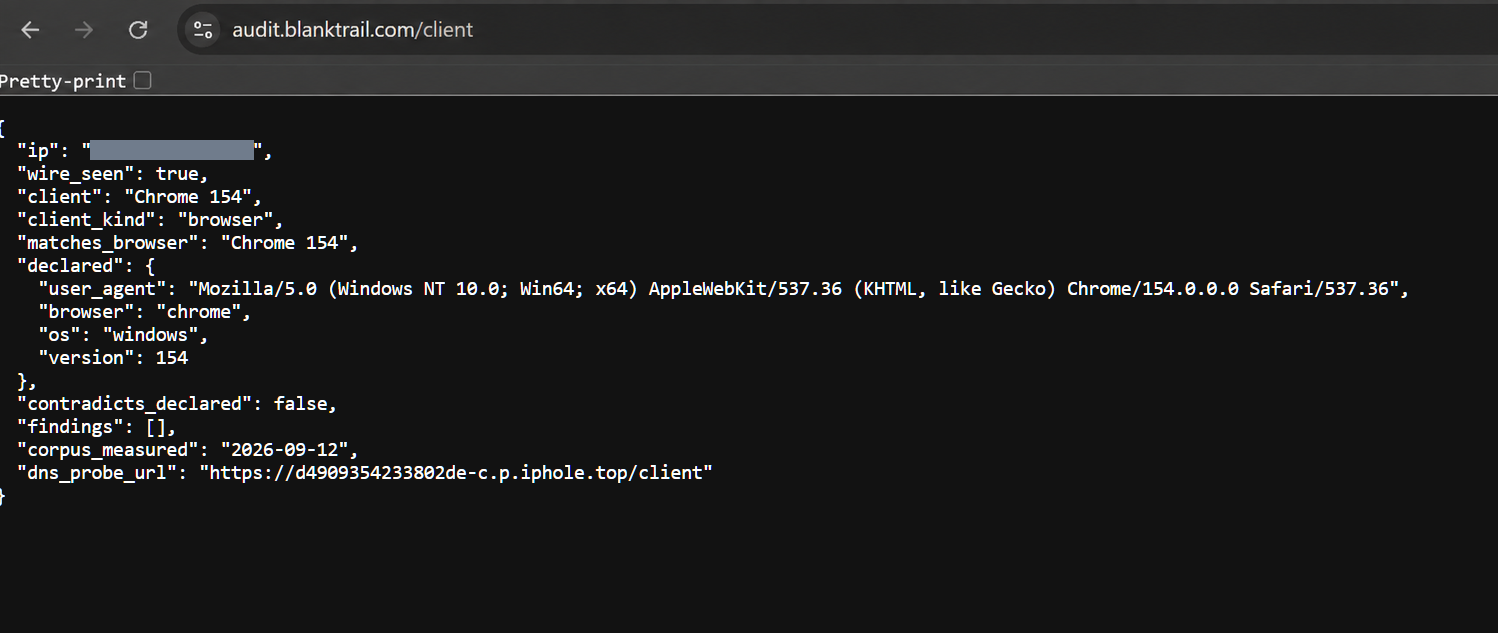
In the screenshot below, a regular Chrome 154 browser accesses our JSON test at audit.blanktrail.com/client. The response contains client: "Chrome 154", client_kind: "browser", matches_browser: "Chrome 154", contradicts_declared: false, and an empty findings array.
What ZennoPoster’s HTTP clients show
In the runs shown here, the test distinguishes the following cases:
| How the request was sent | What the test returned | What it means |
|---|---|---|
| ZennoPoster’s alternative HTTP client | client: "ZennoPoster", client_variant: "plain_client", client_kind: "client" | The connection is identified as ZennoPoster’s HTTP client |
| ZennoPoster’s TLS client | client: "ZennoPoster", client_kind: "client" | In this configuration, implementation characteristics still allow the client to be identified |
| Alternative client through BlankTrail | client: "Chrome 152", client_kind: "browser", matches_browser: "Chrome 152" | From the test’s perspective, the connection matches the selected Chrome network profile |
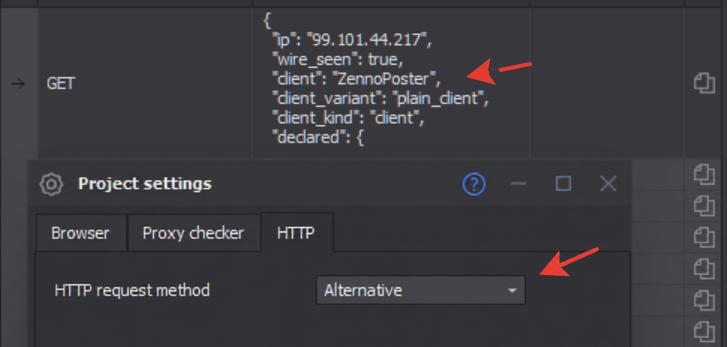
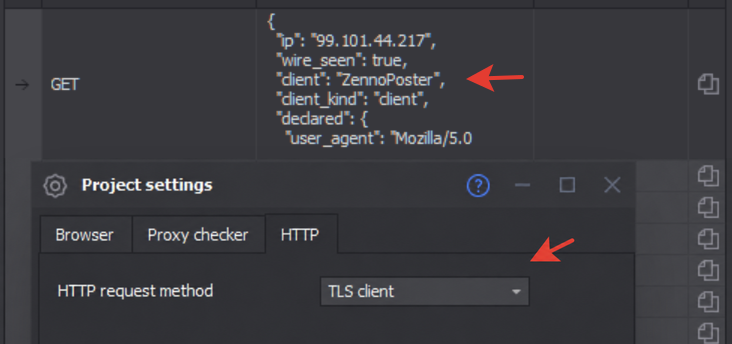
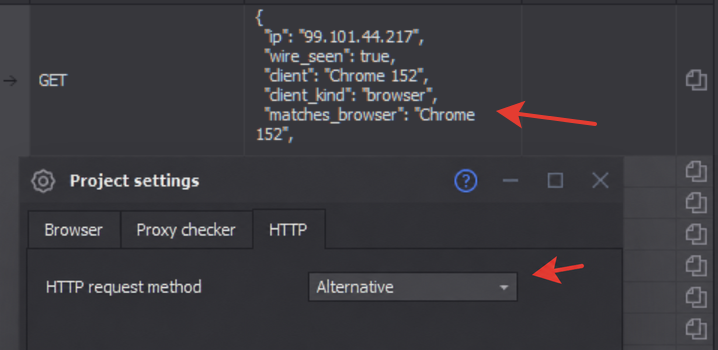
This is client identification by network fingerprint, rather than a leak of your IP. We’ll cover an actual leak below.
What BlankTrail changes
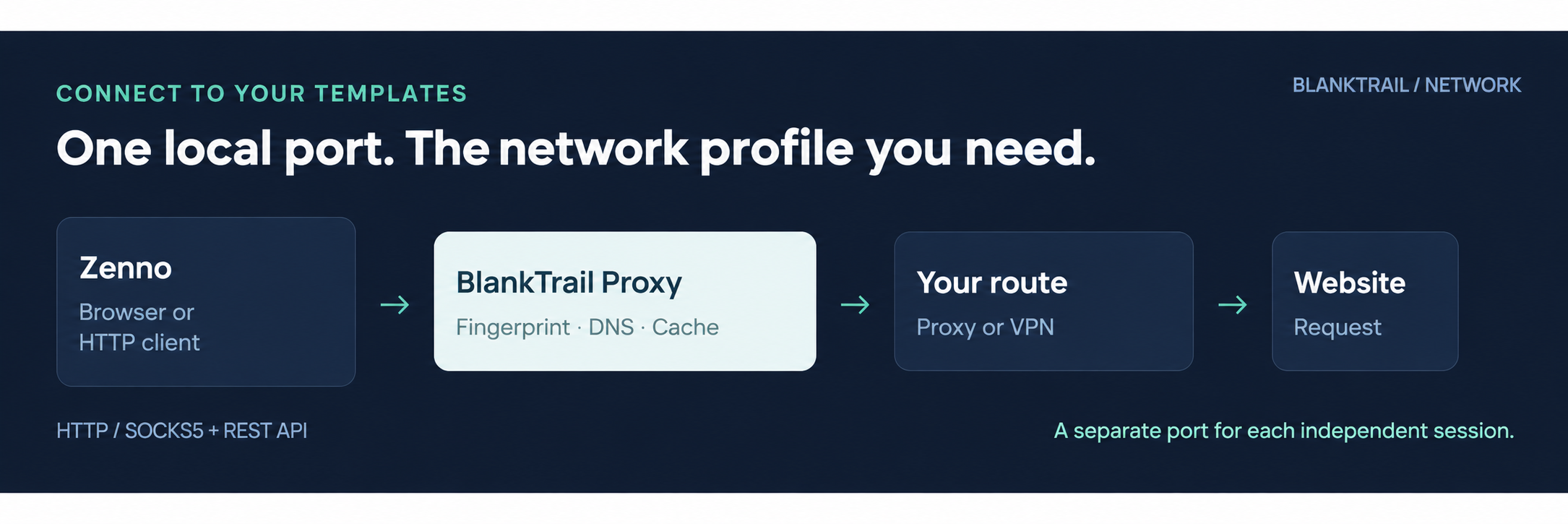
BlankTrail establishes the connection to the site using the selected profile. Its database contains fingerprints from real Chrome, Firefox, Edge, and Safari browsers across different versions, devices, and operating systems. Its own emulation engine reproduces TLS and HTTP/2 parameters; the User-Agent and Client Hints can be aligned with that profile.
We compare connections beyond JA3/JA4 values: a matching short identifier does not mean that all protocol behavior matches. In our comparative tests, popular libraries, including uTLS, curl_cffi, and TLS-Cloak, retained differences from the reference browsers. It is better to test the specific client version you use on the test site than to judge it by the library’s name.
A network profile does not replace the JavaScript environment: if you use Zenno’s actual browser, its settings need to match the selected network identity. For mobile app APIs, BlankTrail also lets you capture an app’s network fingerprint and use it for subsequent emulation.
2. Real DNS leak examples: the proxy is set, but the routes diverge
DNS is a separate network exchange. The browser or its internal mechanisms can resolve names independently, even when the main page request goes through a proxy. Setting a proxy and enabling WebRTC emulation do not, by themselves, prove that all DNS queries take the same route.
Example: a home subnet is exposed through ECS
In the next screenshot, ZennoPoster has a SOCKS5 proxy configured, with geolocation, time zone, and WebRTC emulation enabled. DNS-over-HTTPS is not enabled. The test site reports ecs_foreign, mixed_ecs, and mixed_egress.
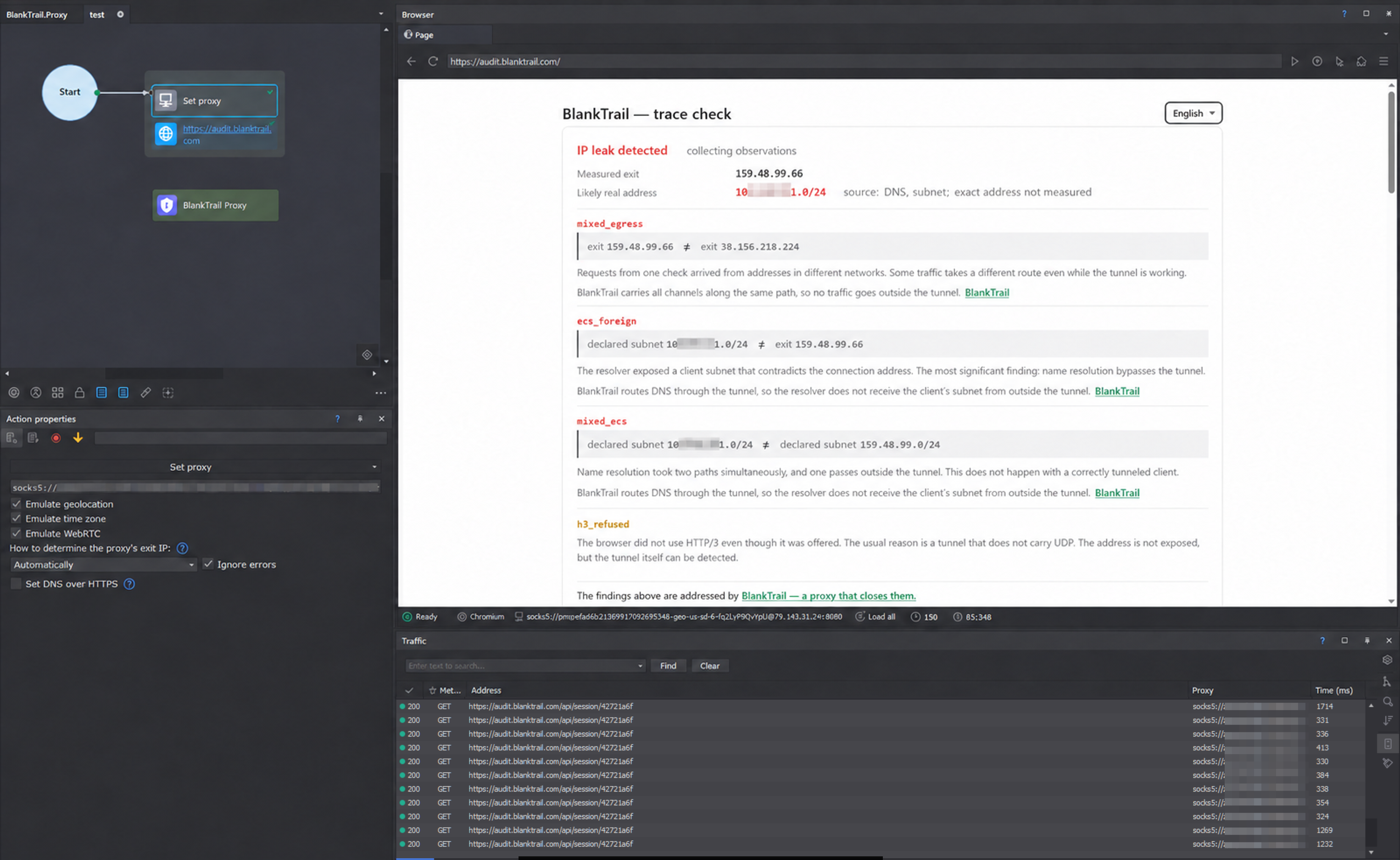
It is important to interpret the result correctly:
ecs_foreign— DNS passed along a subnet that contradicts the address of the main connection. In this example, the test site shows the actual subnet, rather than the exact home IP. This is still a significant leak that exposes you on every request and links all your sessions across every instance, regardless of which proxies you use or how you change the browser profile. A /24 subnet contains just 256 addresses, so it narrows you down considerably.mixed_ecs— different ECS values were observed in a single check. Name resolution does not appear to follow one consistent route.mixed_egress— server requests from a single check arrived from different exit addresses. This is a reason to check routing and proxy rotation; two different exits do not, by themselves, prove that one is your home connection.
ECS, or EDNS Client Subnet, carries information about the client’s network in a DNS query. If the query reaches the resolver through your home connection, the resolver sees its real source and may pass on that address prefix. The web request arrives from the proxy’s IP, while DNS points to a different network. The mechanism and its privacy implications are described in RFC 7871.
Example: enabling public DoH does not guarantee a consistent route
In another screenshot, Cloudflare DoH is specified in Zenno’s built-in action. The visible part of the result still contains mixed_egress, mixed_ecs, and the h3_refused warning.
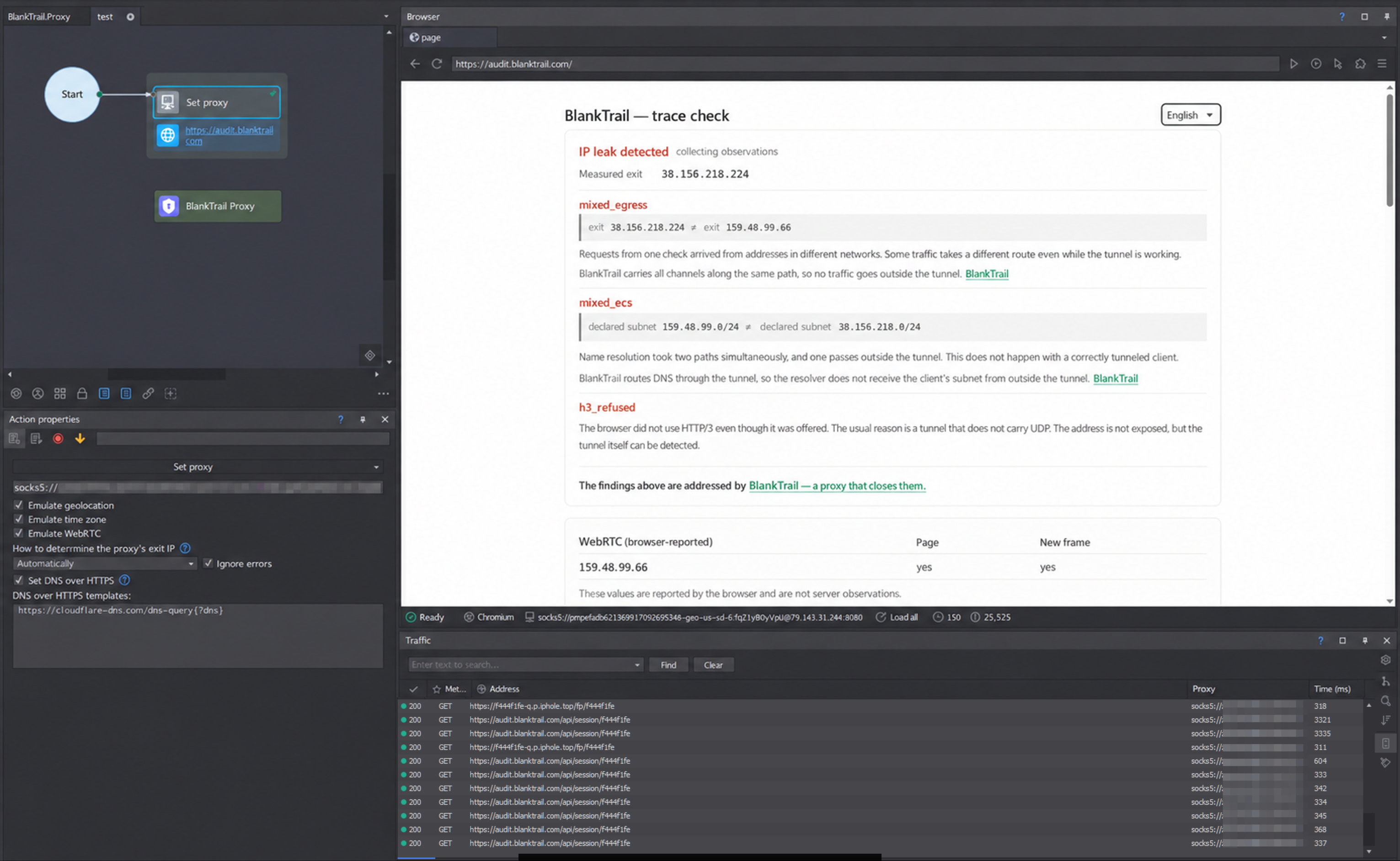
This example does not mean that Cloudflare passed along your home subnet: the screenshot does not support that conclusion. It shows something else: selecting public DoH alone does not confirm that the entire exchange is tied to the intended exit. DNS encryption and DNS routing address different issues. Google’s DoH servers, for example, have been observed occasionally exposing an ECS subnet, though not consistently on every query.
3. How vDNS, built-in DoH, and TUN address different parts of the problem
vDNS: a resolver that matches the exit’s ISP and location
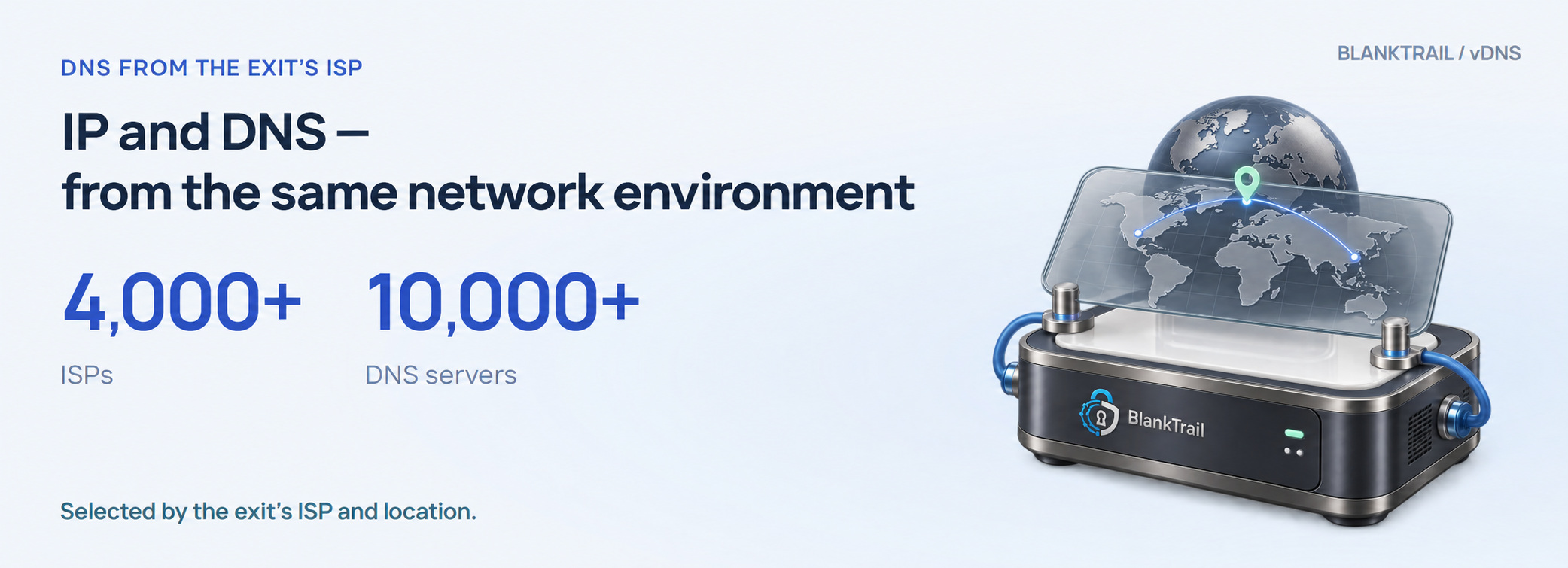
Ordinary people use public resolvers, and using one is not, in itself, a sign of automation. However, while building our own database of ISP DNS servers, we found that fewer than 20% of real users use public DNS servers from Google, Cloudflare, or other providers. The vast majority of subscribers keep their ISP’s DNS settings. For sites and their anti-fraud systems, a resolution query from the DNS servers of the ISP associated with the IP therefore looks much more appropriate.
BlankTrail has its own database of over 4,000 ISPs and over 10,000 DNS servers. This is a database of ISP resolvers, most of which are available only to their subscribers, rather than a collection of publicly accessible DNS servers.
BlankTrail identifies the exit’s ISP, takes its location into account, selects a suitable available resolver, and accesses it through that exit. This makes the combination of IP, DNS, and location identical to that of an ordinary subscriber, eliminating some inconsistencies under strict checks.
Other modes are also available:
- Public DNS with the exit’s ECS — for example, Google DNS with the proxy’s subnet instead of your home network. This suits server proxies that have no native ISP DNS server.
- Independent resolution through the exit — BlankTrail follows the DNS chain itself, querying root servers, zone servers, and the domains’ authoritative servers. No intermediate public or ISP recursive resolver is used; the exit IP is the source of the queries. The proxy itself does not become a separate DNS service. This resolution mode gives ideal geographic accuracy for CDNs and bypasses potential filters and restrictions on ISP or public DNS servers, but it looks less natural and matches only the very small proportion of users who run their own DNS server, for example on a router.
- Delegating resolution to the proxy — resolving names using the proxy’s own capabilities.
Built-in DoH: browser DNS through BlankTrail without TUN
vDNS can process only the queries that reach it. That is why BlankTrail includes its own DNS-over-HTTPS server on the product’s port: you can enter its address in the browser’s secure DNS settings.
The browser sends its independent DNS queries to BlankTrail, which then processes them through the exit according to the selected port’s DNS policy. Incoming client ECS is removed: the port’s settings determine how a subnet is used afterward. Different browser profiles can use DoH on different ports, each with its own exit and settings.
This lets you eliminate browser DNS resolution leaks without TUN interception. Strict DoH mode is required, with no automatic fallback to system DNS on error. The distinction between automatic and strict behavior matters for ordinary browsers too; see the settings for Chrome and Firefox.
Our ZennoPoster plugin makes it easier to apply the proxy and DoH settings.
TUN: when an application cannot configure DNS or a proxy
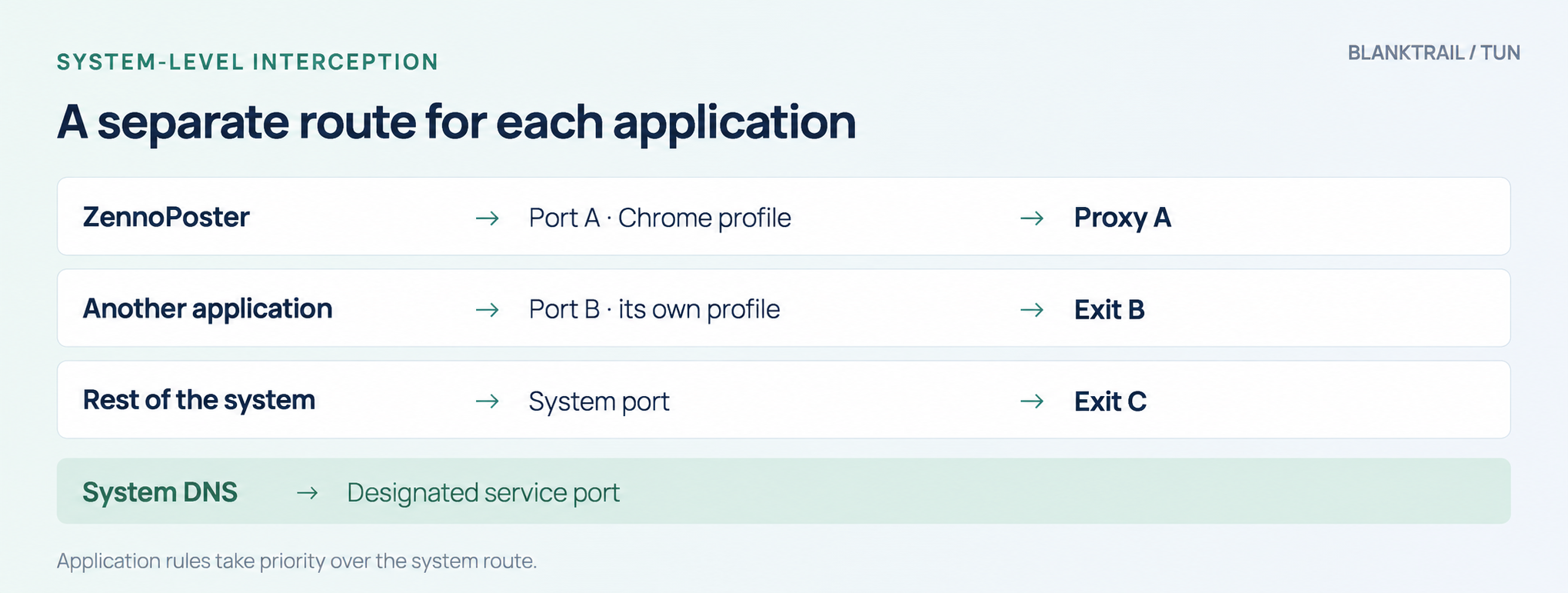
Any application can send DNS queries through a system service, bypassing its own proxy settings. In Zenno, you can configure network behavior through C# and the plugin. Other software may not offer that option.
In that case, system-level TUN interception is used. It routes traffic to the selected BlankTrail port and handles ordinary DNS queries, including those originating from system resolution services.
You can intercept the entire system or individual applications, including their child processes. Different programs can use different ports: for example, ZennoPoster can use one proxy and profile, while another program uses a different exit. In per-application mode, system DNS handling is enabled separately; a service port is selected for the shared system resolver.
DoH is suitable for DNS in a browser that supports it. TUN provides broader control over network traffic. Configuring DoH alone does not reroute every connection on the computer.
4. HTTP/3 and QUIC: why a green DNS test does not settle the protocol question
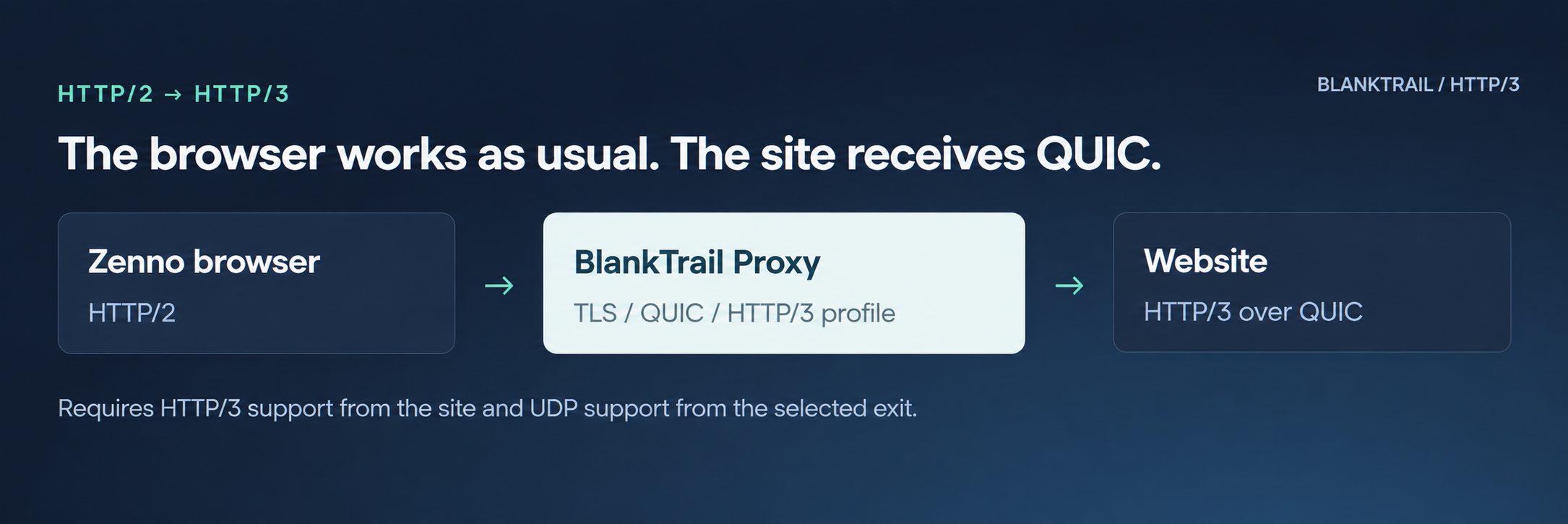
Many major sites and CDNs support HTTP/3: HTTP over QUIC and UDP. When using a regular HTTP/SOCKS5 proxy, the Zenno browser, like standard Chrome, does not use that proxy for HTTP/3 connections to the site. Chromium’s documentation specifically states that SOCKS5 is used for TCP requests, rather than UDP transmission. Chromium documentation.
The absence of HTTP/3 does not, by itself, expose an IP or prove automation. UDP may be unavailable on an ordinary network too. Still, it is another connection characteristic that a site can compare with the rest of the profile.
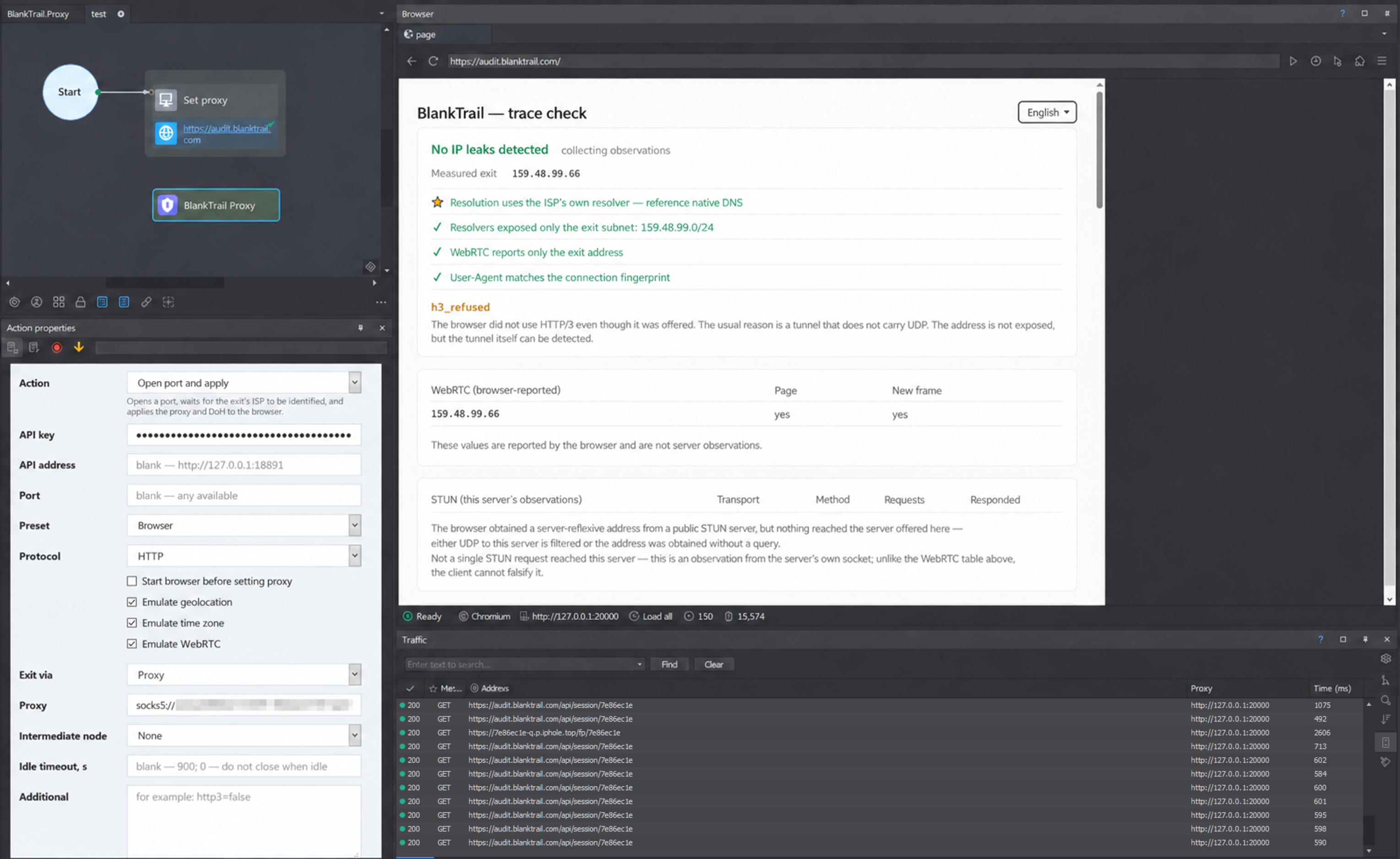
Example: DNS is consistent, but HTTP/3 is not yet in use
In the next screenshot, after BlankTrail is connected, the test site reports an ISP resolver, ECS limited to the exit subnet, and a consistent User-Agent. At the same time, h3_refused remains.
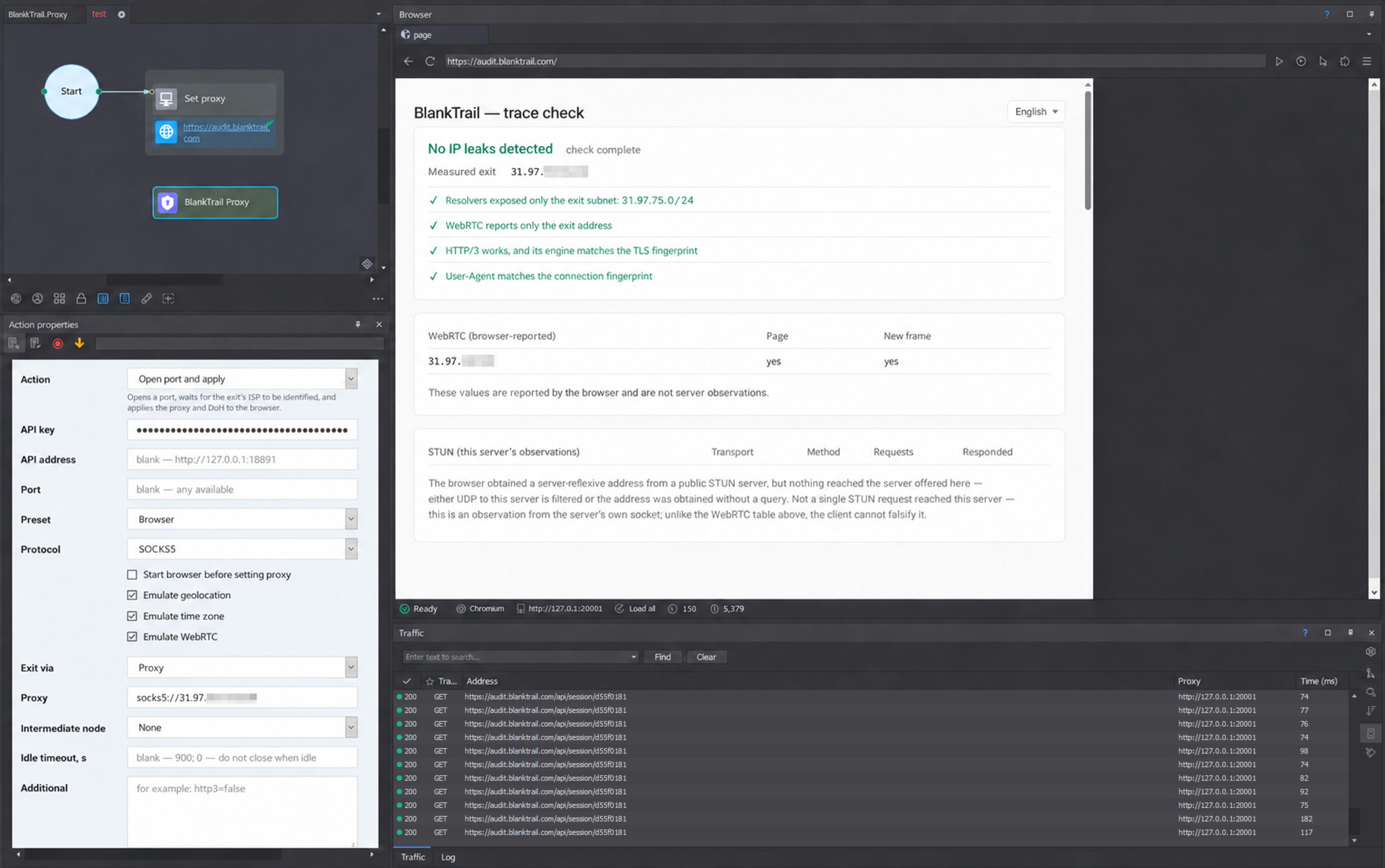
Example: a completed check with HTTP/3
A completed check is shown on another exit. The test site reports that no IP leaks were detected, ECS refers only to the exit subnet, HTTP/3 is working and its engine is consistent with TLS, and the User-Agent matches the connection fingerprint. Since this is a server proxy, there is no ISP DNS server indicator here, but the query still arrived with consistent ECS, even for a server proxy.
BlankTrail accepts Zenno’s requests over HTTP/2 and can establish an HTTP/3 connection over QUIC with the site, taking the selected browser’s network profile into account at this level too.
For this to work, the site must support HTTP/3 and the selected exit must carry UDP, for example through a working SOCKS5 UDP relay. If UDP is unavailable, HTTP/2 is used. BlankTrail does not send QUIC directly around the configured proxy to get a green indicator at the cost of a different exit IP.
5. Independent sessions require isolated network state
In our ZennoPoster tests, we have encountered a scenario where a new browser instance retains a network-level link to the previous session when the same proxy string is reused. Even if the IP behind that address has changed, restarting the instance may not be enough. For example, you use a proxy whose exit IP changes through an API request: you work in one ZennoPoster session, end it, change the exit IP through the proxy service’s API, and start a new session. Cookies, cache, IP, and browser profile have all changed, yet the network-level leak remains. The site sees it and links all your sessions, accounts, and so on.
You can check this yourself on our audit test site by making successive visits from new sessions using the same proxy string. If a link to another session is detected on a new visit, the test site displays an indicator.
In BlankTrail, network connection state is isolated by port. Independent tasks receive separate ports with their own profiles and routes. If you need to continue the previous task, you can export and import the port’s session together with its profile, fingerprint, and TLS session.
6. Smart Cache and routing: fewer repeat downloads, more control
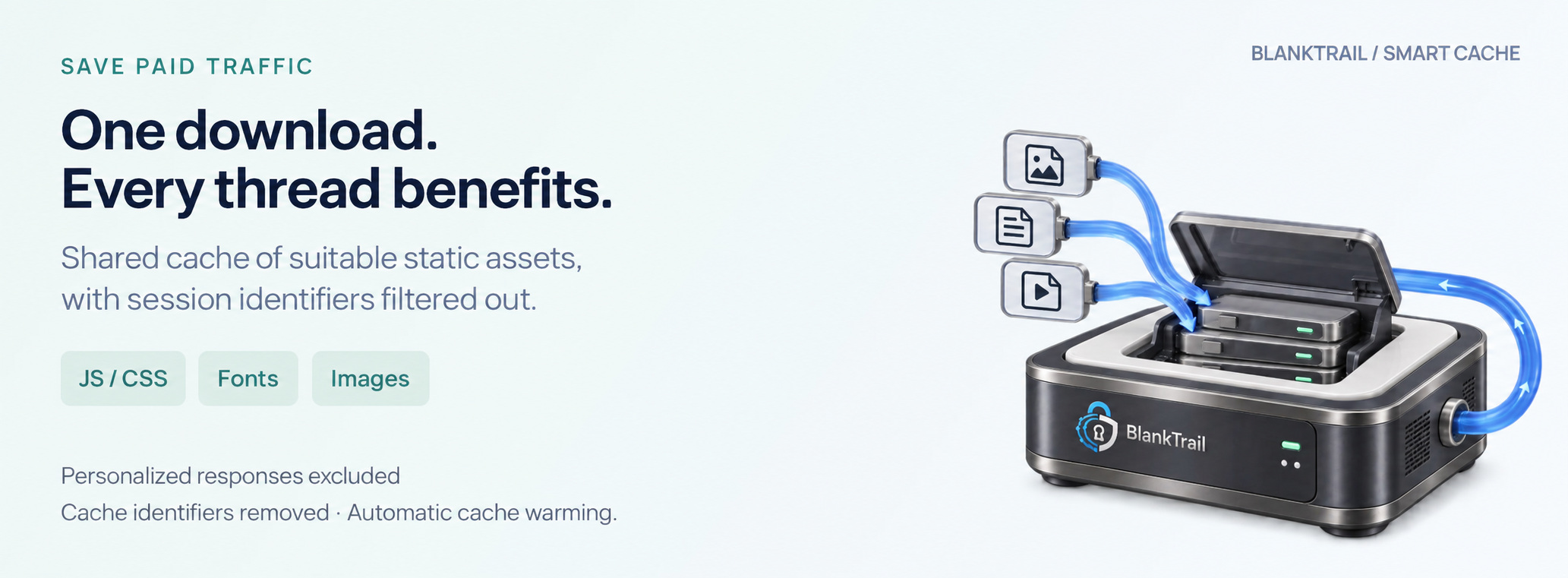
In multithreaded templates, the same scripts, styles, fonts, and images are downloaded repeatedly. But if you do not clear the browser cache, identifiers will leak through it, making it easy for the site to link all your sessions and accounts. Smart Cache lets threads share a cache of suitable static assets and reduces paid proxy traffic usage.
BlankTrail analyzes signs of personalization, excludes those responses from the shared cache, and removes identifiers that could link visits, including ETag. Domain and resource exclusions are available, along with automatic cache warming. Savings are assessed using the actual statistics of the specific project.
You can use HTTP/SOCKS5 proxies, OpenVPN, WireGuard, VLESS (including REALITY), Trojan, Shadowsocks, VMess, and Hysteria 2 as exits. Applications can access VPN and tunnel connections through a regular BlankTrail local proxy port.
Connection chains and domain-based routing let you define different paths for different sites. The REST API and presets help you create ports, change settings, and manage multithreaded projects directly from a template.
7. CAPTCHAs and browser checks, including on Linux without a GPU
BlankTrail also includes Challenge Breaker: its own browser component based on a carefully modified Chromium that produces the reference fingerprint for the profile even when running on Linux without a GPU, along with local mechanisms for solving supported CAPTCHAs.
Supported scenarios include Cloudflare/Turnstile checks, reCAPTCHA v2, AWS WAF, Geetest sliders, Avito, Ozon, and Google text CAPTCHAs. Solving takes place on the machine running BlankTrail. Tasks requiring image recognition use local models, without sending data to external services or incurring additional charges.
When working through requests, Challenge Breaker opens the required page, completes the supported check, and provides a working session state for subsequent requests through BlankTrail. The exit and network profile must remain consistent: transferring the result to an arbitrary client with a different IP is not equivalent to continuing the same session.
There is also an API following the Anti-captcha standard (Antigate V2):
RecaptchaV2Task, ImageToTextTask, and AntiGateTask. You can use it in place of an external CAPTCHA recognition service simply by changing the service address in the relevant software to the address and port specified in your local BlankTrail Proxy settings. Use this API, for example, to obtain a reCAPTCHA v2 or v3 token, recognize supported text CAPTCHAs, or obtain a session after a Cloudflare or similar browser check when automatic handling through Challenge Breaker does not suit your task.
A physical graphics card is not required. BlankTrail can solve supported CAPTCHAs on a Linux server without a GPU: recognition can run on the CPU, and the browser component can use software graphics. Speed and the number of concurrent tasks depend on the processor, memory, and complexity of the check.
8. The ZennoPoster plugin: connect through a familiar action block
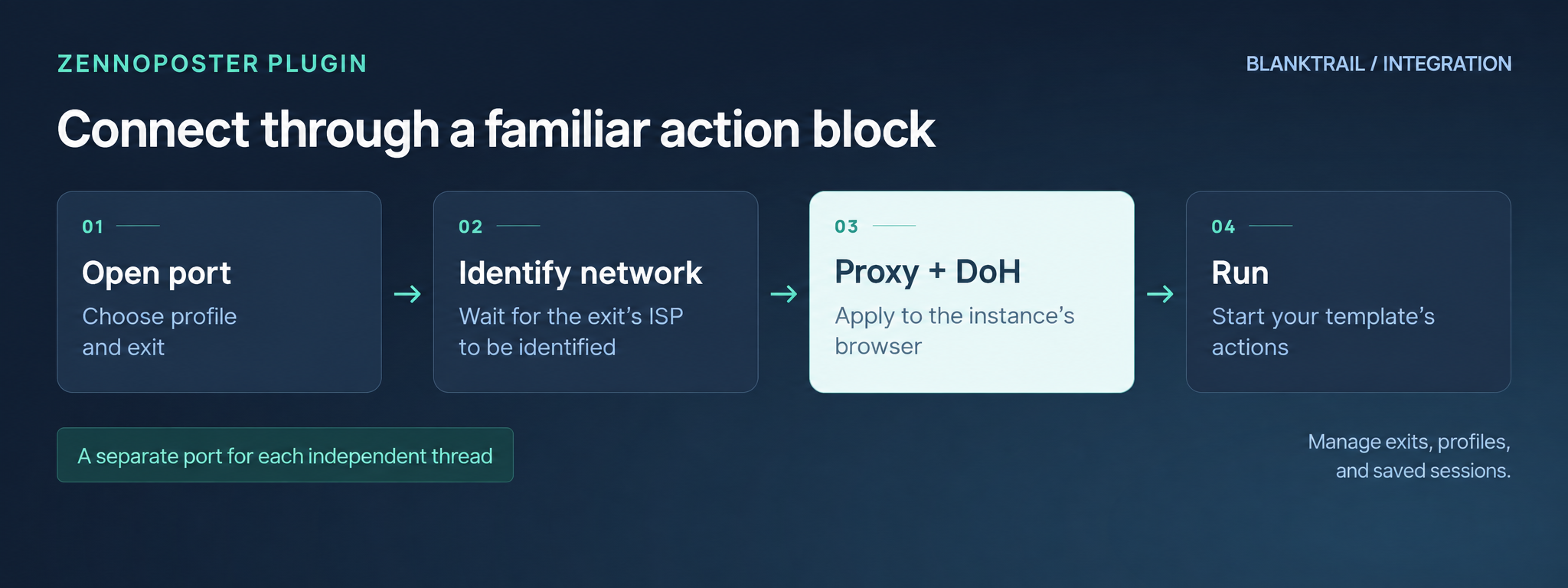
To spare you from assembling API calls manually, we created the BlankTrail Proxy plugin for ZennoPoster and ProjectMaker. In the screenshots with positive results, its interface and the “Open port and apply” action are visible on the left.
The plugin opens a port with the selected settings, waits for the exit’s ISP to be identified, and applies the proxy together with DoH to the instance’s browser. The form lets you specify the API key, BlankTrail address, preset, protocol, exit through a proxy or VPN gateway, and additional parameters.
Beyond the initial connection, it supports changing the exit and profile, checking for leaks, saving and loading sessions, changing settings, closing a port, and cleaning up forgotten ports. C# calls are also available to template developers.
This simplifies multithreaded work: a thread gets its own port, uses it for the task, and releases it when finished. The plugin is available to download from your account dashboard.
9. How to repeat the checks in your own template
For the comparison, record the ZennoPoster and engine versions, HTTP client type, selected profile, DNS mode, and proxy exit. Use a stable exit where possible: rotation during a check makes mixed_egress harder to interpret.
Checking DNS, ECS, HTTP/3, and session links
- Open audit.blanktrail.com in a new browser instance with your project’s usual settings.
- Wait for the check to finish. The
collecting observationsmessage means the result is still being updated. - Save the result: measured exit, ECS, resolvers, server-side observations, and warnings. Pay particular attention to
ecs_foreign,mixed_ecs,mixed_egress, andh3_refused. - Connect BlankTrail through the plugin, apply DoH, and repeat the check in a new instance. When configuring it manually, verify that strict DoH mode is enabled without fallback to system DNS.
- Compare routes and subnets. Assess HTTP/3 with the exit’s UDP support in mind. WebRTC information reported by the browser does not replace server-side observations.
- To check for session links, make several successive visits from new instances using the same proxy string and look for the corresponding indicator.
A green result means the test site did not detect the inconsistencies it checks for in this run. It is useful to repeat the check after changing the exit, settings, or browser version.
Checking ZennoPoster’s HTTP client fingerprint
- Send a GET request to audit.blanktrail.com/client from a real browser: this is the control example.
- Access the same JSON endpoint with ZennoPoster’s HTTP client. Check the modes you use one by one, including the alternative and TLS clients. Save the responses.
- Repeat the HTTP request through a BlankTrail port with the required browser profile. Align the User-Agent and other settings with the selected version.
- Compare
client,client_kind,matches_browser,contradicts_declared, andfindingswhen those fields are present in the response. - Check the match against the selected profile. If Chrome 152 is selected, the expected reference is Chrome 152.
The JSON response checks the network side of the request. Assessing the JavaScript environment and browser behavior requires the appropriate browser tests.
Start with your own project
The Lite plan is free and available to everyone. To try the Pro / Enterprise plan with vDNS and Challenge Breaker, contact support and you will receive one day of trial access.
Get started with BlankTrail · ZennoPoster plugin · DNS and session check · HTTP client check